How do absences, rescheduling and monthly tuition at the desk work?
Mark a weekly athlete Away to free their spot, let families reschedule to a class with room, and sign people up for prorated monthly tuition.
A family that can't make a class shouldn't leave an empty spot. Mark them away, or let them move the class, and the spot goes to someone else.
Before you begin
- Away and Reschedule are for athletes who come every week: monthly tuition, or enrolled every week by staff.
- Monthly tuition needs online payments on (Money > Stripe) and a monthly price on the class (Class settings).
Steps
Mark an athlete away for one date
- Open Bookings, find the class and date and press Roster.
- Press Away this day next to the athlete.
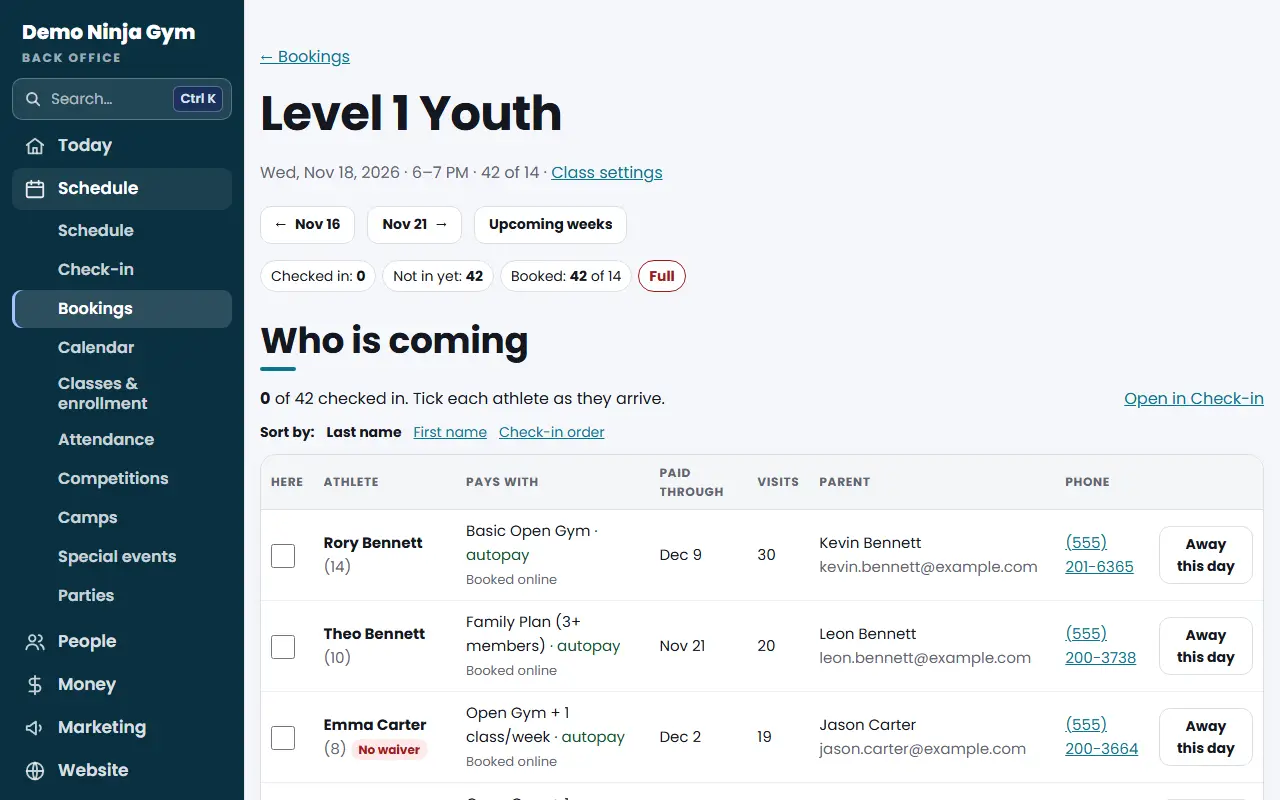
- They move to Away this day and the counts show one more spot open. Changed your mind? Press Coming after all.
What a family does to reschedule
- In My account, under Your schedule > Weekly classes, the parent opens Reschedule a class.
- They choose Class to Miss and Come Instead To, which lists only classes with a spot open in the same month as the class they miss, and press Reschedule. For example, a Saturday class on November 22 can move to Thursday, November 20 or 27, but not to December.
- Their own class that date shows them as away, and the other class's roster shows them with Rescheduled here. You get a push notification.
To put it back, press Undo reschedule next to them on the other class's roster.
See the coming weeks for a class
- On a roster, press Upcoming weeks.
- Each weekly athlete has a row and each date a column: ✓ Here, ✕ Absent, Away, Moved, Paid, Autopay (monthly tuition that renews by card), ! Owes, On hold or Class off. Under each future date you see how many spots are open.
- Press a date to open that date's roster.
Sign someone up for monthly tuition at the desk
- On the roster, press Monthly tuition next to an athlete who owes (enrolled every week by staff, a walk-in or a free trial).
- The page shows what the parent will pay: the prorated first payment and then the monthly price on your billing day.
- Press Open the enrollment form here and hand the screen to the parent, or copy the link and text or email it to them. Their details are filled in. They pick the first class, tick the renewal box and pay. The link works for 7 days.
What you'll see
Once the parent pays, the athlete shows with their plan and autopay on the roster, and the "pays at the desk" row is gone.
Troubleshooting
A family sees no Reschedule a class. It is too close to the class, their membership is on hold or has a failed payment, or no other class at that location has a spot open for their child's age in that month.
"Online payments aren't switched on yet." Monthly tuition needs Stripe connected under Money > Stripe.
Away this day is missing. It shows only for athletes who come every week, and only for today or a later date.
Questions
What happens to the spot when someone is away?
That date has one more spot open. Your Book a class page offers it for a free trial or a single day, and the roster shows it as open for a drop-in.
Can parents cancel a weekly class?
No. They can only reschedule one date to another class that has a spot open, for their child's age, at the same location, in the same month as the class they miss. Changes close the same number of hours before class as other class changes (2 by default).
Can a family save a missed class for next month?
No. A class moves to another day in the same month; it is never saved as a credit, carried into the next month or added on top of what their plan pays for. A family with one class a week still comes once a week, just on a different day. A rescheduled class can't be moved again.
Does a rescheduled class cost anything?
No. Their monthly tuition covers it. Check-in is one tap, like their own class.
How is the first month priced when someone signs up at the desk?
The same as online. Everyone is billed on the billing day in Classes & enrollment > Tuition rules (the 1st unless you changed it), and the first payment covers only the classes left before then. With prorating off, the first month is charged in full and then every month on that date.
Can staff tick the renewal box for the parent?
No. The automatic renewal laws want the parent to agree, so the parent ticks it and pays on the link, on your screen or their phone.