Every email your families get, in your own words
Send news about a camp or a closure to exactly the right families, and change the words of every automatic email, from the free trial follow-up to the waitlist offer, with a preview on a phone before you save.
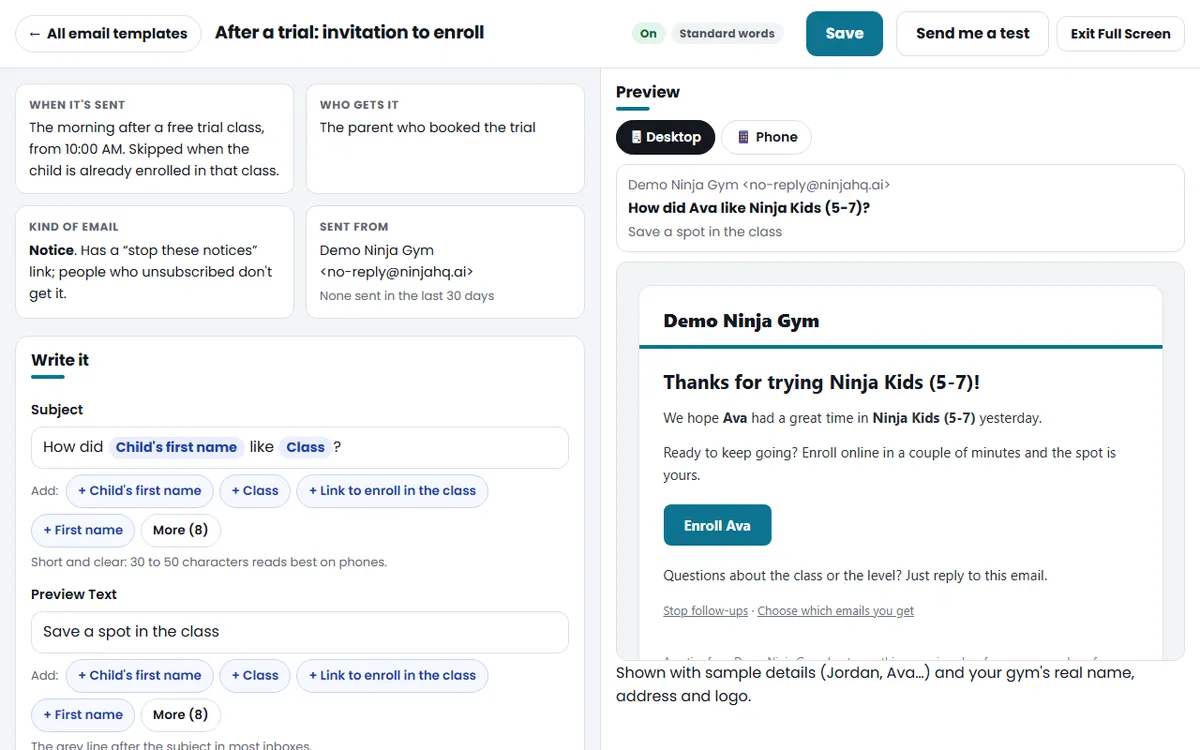
The right email, to the right families
Write one, then change an automatic one
- 1. Start from a camp reminderThe dates, message and Sign up button are filled in.
- 2. Who gets it, already pickedEveryone who said yes to news, except families already signed up.
- 3. Send it now or laterPick a time, or send yourself a test first.
- 4. Open an automatic emailEvery email your website sends by itself is in one list.
- 5. Use your own wordsAdd the child's first name or the class with one tap.
- 6. See it on a phone, then saveFrom then on every family gets your words.
A camp reminder and a trial follow-up. Sample data.
A video from a demo gym with sample data.
The right families, already picked
Choose who gets it from lists your gym already has: current members, families signed up for a camp day, birthday party guests who said yes, or everyone who said yes to news.
- Start from somethingA camp sign-up reminder fills in the dates, the message and a Sign up button, and leaves out families already signed up.
- Your own templatesSave the emails you send again and again (a snow day, a closure, a camp announcement) with text, a highlighted box, a button and a picture.
- Send it now or laterPick a send time in your gym's time zone, send yourself a test, and see how many families it will reach before you confirm.
- From a flyerAny flyer becomes an email draft with a link to its PDF.
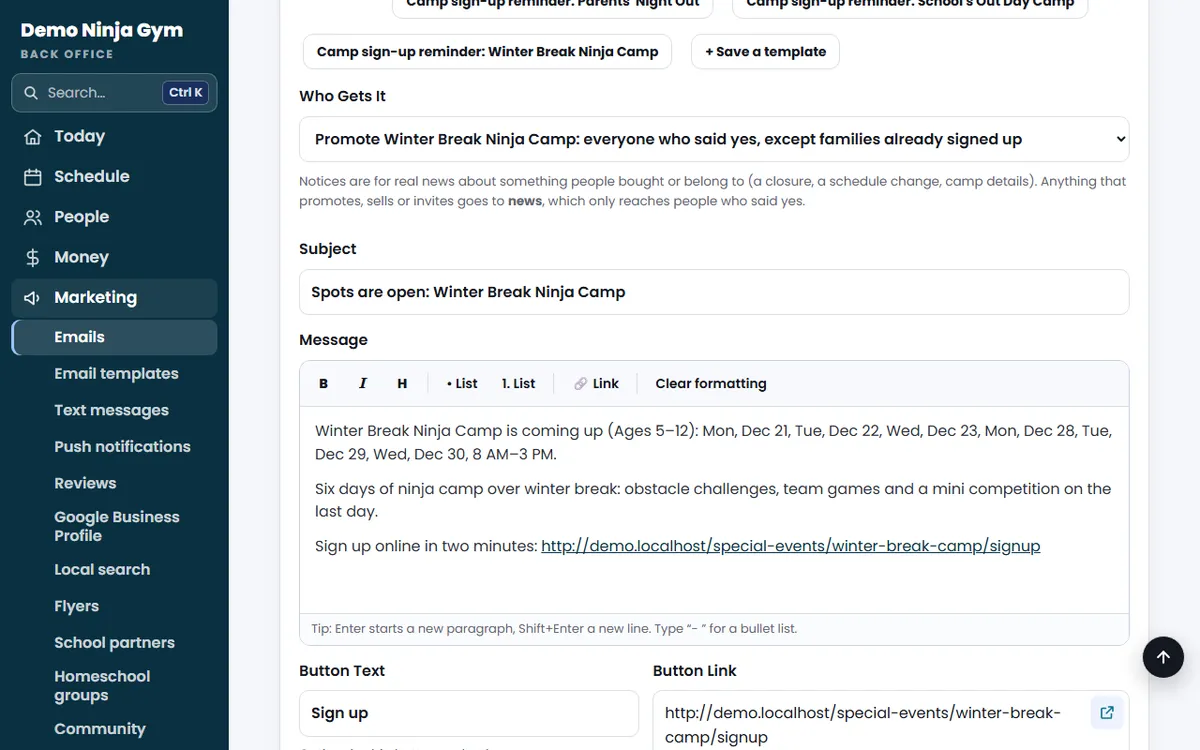
Marketing > Emails. Sample data.
The automatic emails, all in one list
Every email your website sends by itself is listed with when it goes out and who gets it. Open one to change its words.
- Details that fill themselves inAdd the child's first name, the class, a link to enroll and your gym's details with one tap.
- See it on a phonePreview it at desktop and phone size with sample details, then send yourself a test.
- Turn reminders on or offCamp, free trial, party and waitlist reminders go out only if you want them.
- Some stay standardReceipts, sign-in and legal emails keep the standard wording, so they always say what they must.
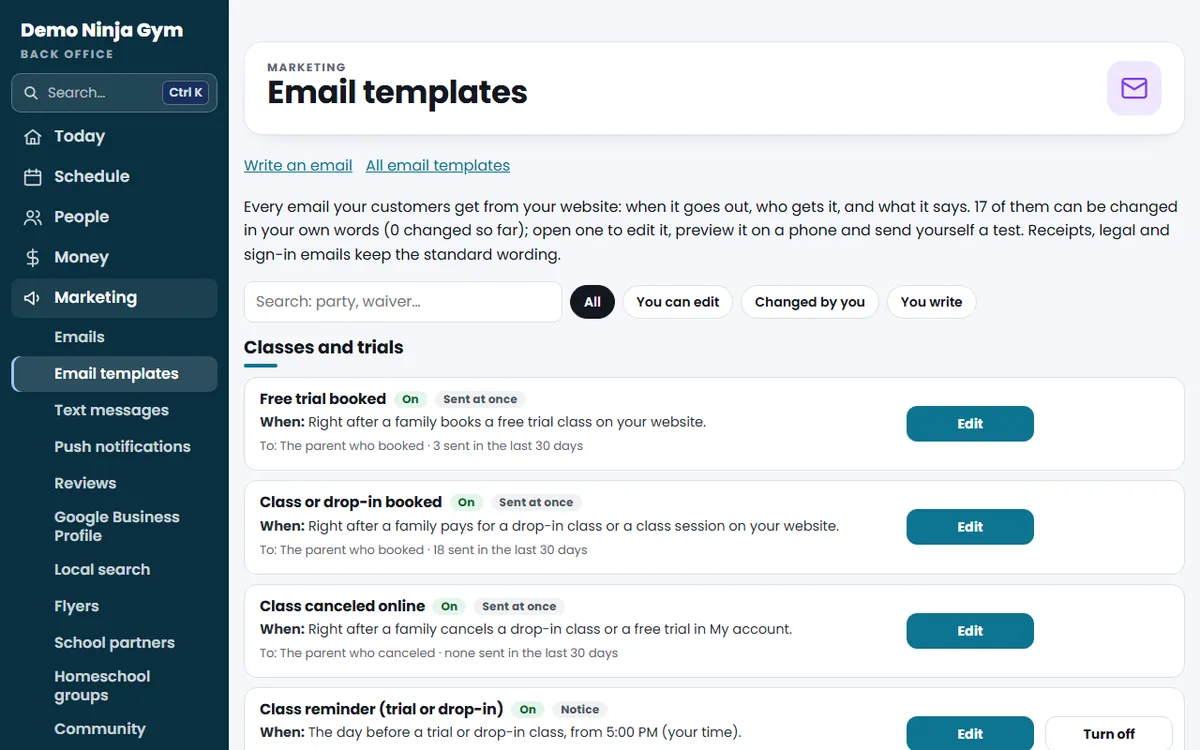
Marketing > Email templates. Sample data.
News only for families who said yes
Notices and news, kept apart
Notices are real news about something a family bought or belongs to, like a closure or camp details. Anything that promotes or invites is news, and reaches only the people who said yes.
Unsubscribe in one click
Every email has an unsubscribe link and your gym's address, and works with Gmail's and Yahoo's one-click unsubscribe. People who unsubscribed or whose email bounced are skipped.
No tracking pictures
No hidden pictures that report who opened an email, and no click tracking.
Owners send
Only owners send emails to customers. Managers can make templates.
Your AI assistant drafts
Ask ChatGPT or Claude to write an email: it saves a draft for you and never sends one.
Emails, answered
Do I still need Mailchimp?
Not for your families. Your lists come from your own sign-ups, waivers, memberships, camps and parties, and every email goes out from Ninja HQ with your gym's name.
Who can I send news to?
Only people who ticked yes to news on a form or a waiver. Notices about something a family bought go to that family unless they unsubscribed from notices.
Can I see who opened my email?
No, on purpose. Ninja HQ doesn't put tracking pictures in emails. To see what an email brought, tag its link: the visits it brings show under Campaigns, counted by your own website.
Can I test before my site launches?
Yes. Before launch, emails go only to your staff and up to 10 test addresses, so no customer gets one by mistake.
Keep exploring
Give your gym the HQ it deserves
Give us your current website and we build your new one, free to explore. No payment before you approve launch. Prefer a walkthrough? Request a 30-minute demo with a Ninja HQ expert.