Birthday parties, booked, signed and sorted
Families book and pay a deposit online. Every party gets its own invitation, in the theme and color the birthday kid picks, with their photo, a countdown and a burst of confetti for every guest. It collects RSVPs and signed waivers in one step. The birthday family watches their guest list fill up, and your coach runs the party from a tablet with every allergy on top.
Booked in two minutes, planned on one page
A new parent books step by step on a phone, the birthday family plans the party, then a guest says yes and signs the waiver in one go.
One step at a time, in a pop-up that remembers
- 1. Tap Book a partyThe booking opens over the party page, five short steps with a numbered row to jump between them.
- 2. Pick a dayA calendar where the dark days have party times, with holidays and gym closures named under it.
- 3. Pick a room and a timeEach party room with only its times that are really free.
- 4. Pick the partyOpen Gym or Closed Gym, and how many kids are coming.
- 5. Add-onsFood and extras, if they want them.
- 6. The birthday kid and your detailsA name, an age, an email and a phone number.
- 7. Pay the depositOn the gym's own Stripe account. The party is booked right away.
Close it halfway and come back later: every answer is still there, on that phone, for 14 days.
A new parent books in the pop-up. Sample gym, prices hidden.
Make it yours, share it
- 1. Open the party pageIn My account: who's coming and whose waiver is signed.
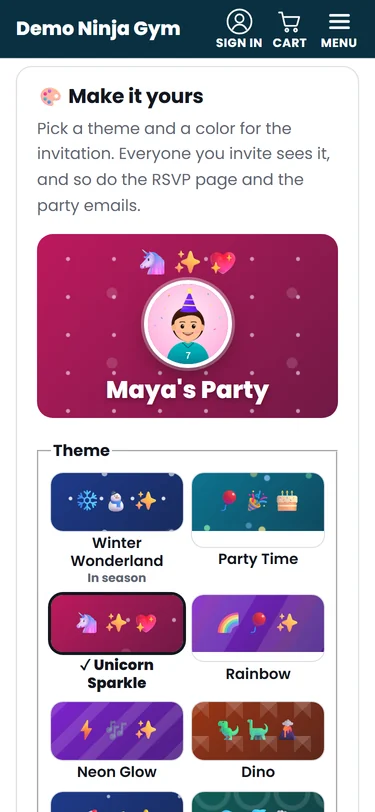
- 2. Make it yoursA theme and a color the birthday kid loves.
- 3. Share the invitationBy text, email or WhatsApp.
Plan and share. Sample gym.
Say yes and sign the waiver in one go
- 1. Open the invitationOn any phone, with nothing to download.
- 2. Tap Count Us InA name, an email, a phone, the children coming and any allergies.
- 3. Sign the waiverStraight away, with the details already filled in.
- 4. The guest list fills upThe birthday family sees who's coming, the allergies and the signed waivers.
From the invitation to the guest list. Sample gym.
Videos from a demo gym with sample families.
From "Book a party" to a five-star review
The family books
Step by step in a pop-up: a day, a room and a time that's really free, the package and extras, then the deposit on your own Stripe account.
They share the invitation
By text, email or WhatsApp, or printed with a QR code. Guests say yes and sign your waiver in the same step.
Your coach runs the party
Check-in with allergies on top, walk-ins, and a one-page run sheet for the room.
Families come back
Party photos with a review request for the host, and a free trial class offer for guests who asked for news.
Invitations as unique as the birthday kid
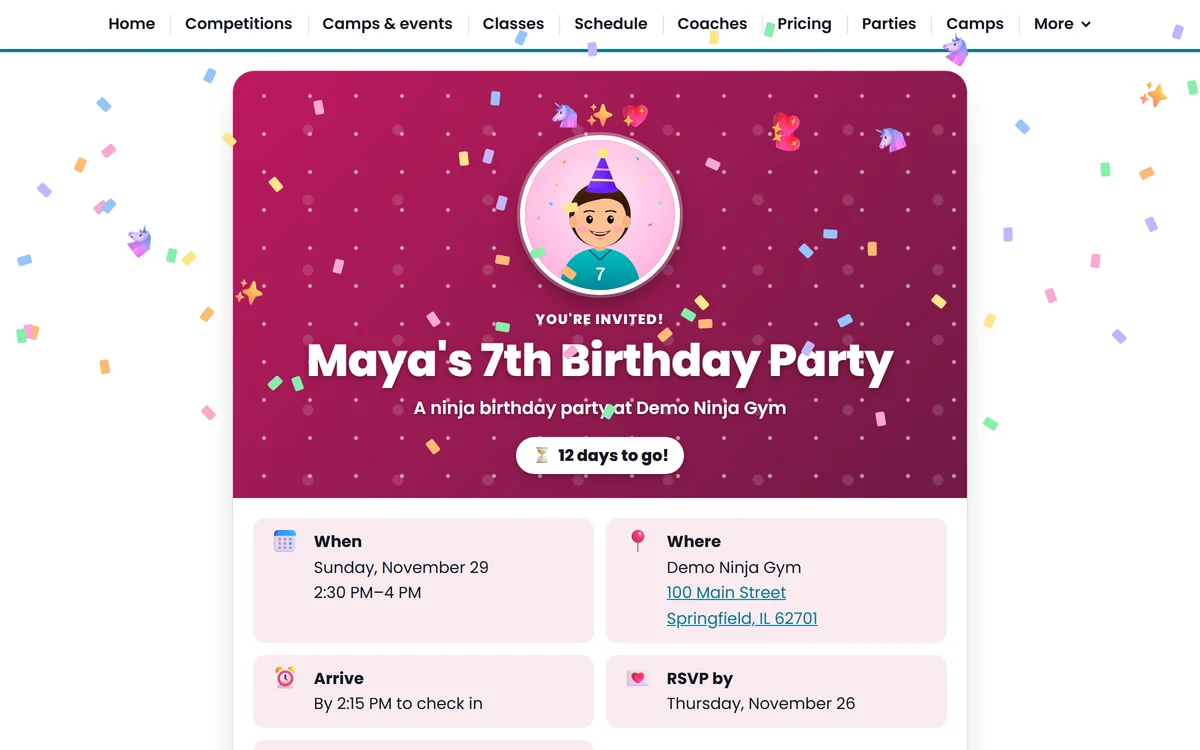
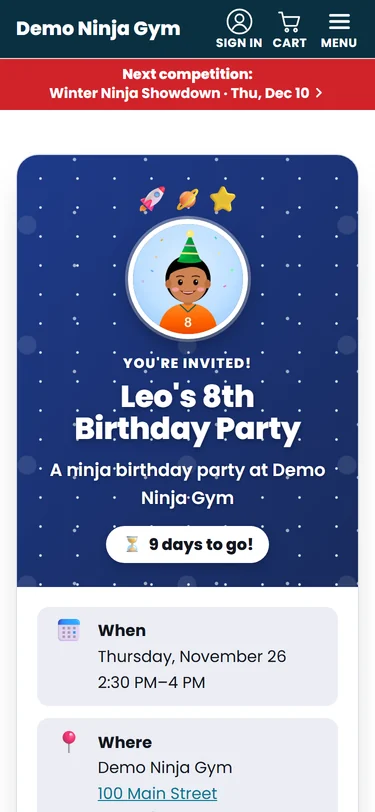
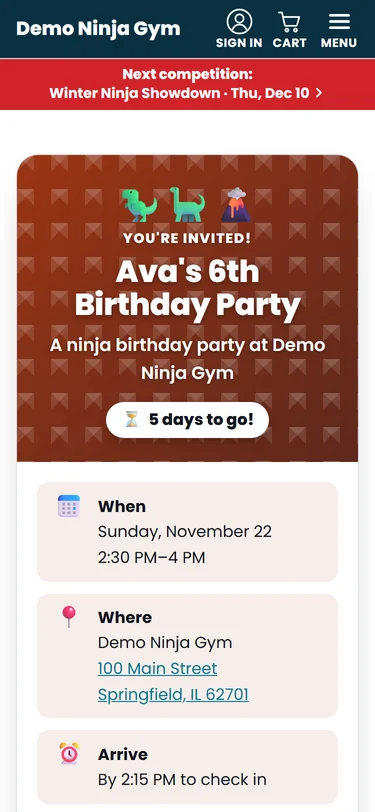
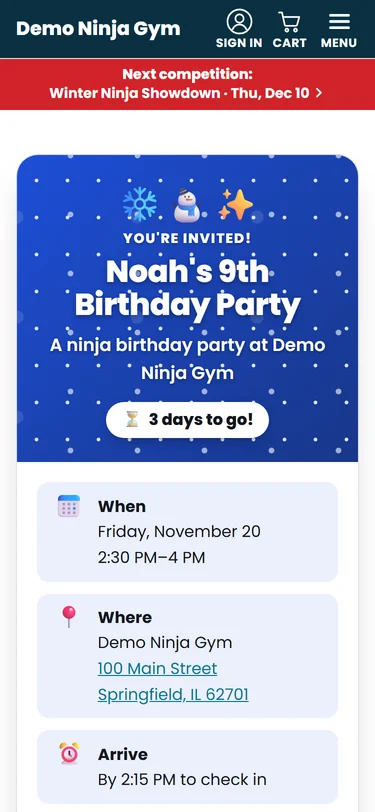
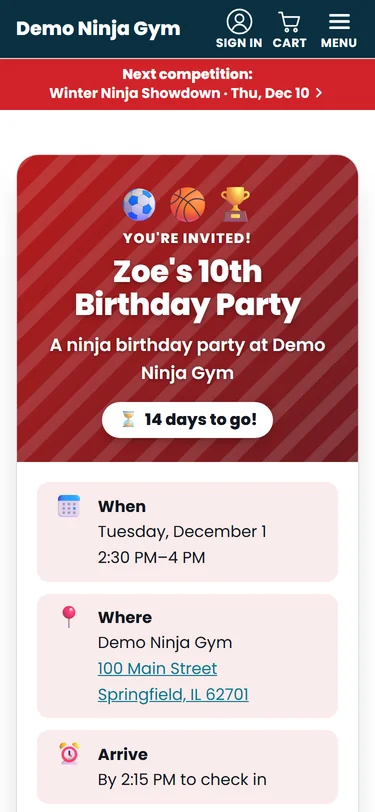
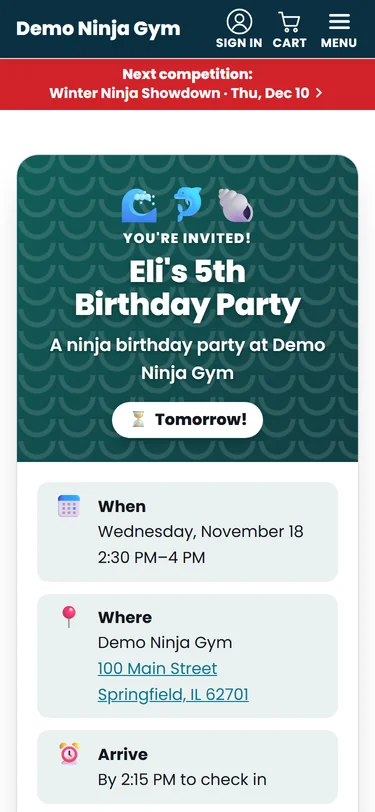
Pink for Maya, outer space for Leo. In a minute on their phone, the family picks a theme, a color and a photo, and every guest opens an invitation made for that kid. It comes with every party, with nothing to add on.
- SpaceWith the birthday kid's photo
- DinoRoar-ange
- Winter WonderlandSeasonal, with falling snow
- Sports StarFor the team captain
- OceanMaking waves
- 🎈 Party Time
- 🦄 Unicorn Sparkle
- 🌈 Rainbow
- ⚡ Neon Glow
- 🦖 Dino
- 🚀 Space
- 🌊 Ocean
- ⚽ Sports Star
- 💥 Superhero
- 🐒 Jungle
- 🌷 Spring Bloom
- ☀️ Summer Splash
- 🎃 Spooky Fun
- ❄️ Winter Wonderland
Screenshots with sample data; the photos are illustrations.
Tap a theme. Pick a color. Add a photo.
Under Make it yours on their party page, the preview changes with every tap, with their child's name and photo on it. One button saves it for every guest.
- 14 themes kids loveTen all year, from Unicorn Sparkle to Superhero, plus Spring Bloom, Summer Splash, Spooky Fun and Winter Wonderland in their seasons. Named for what kids love, never "for boys" or "for girls".
- 9 colors, always easy to readPink, purple, red, orange, green, teal, blue, navy or your gym's own. Every shade is checked so the words stay readable on any phone.
- The birthday kid's photoOne photo in a big circle at the top. Only people with the invitation link see it. It's never in an email, and it's deleted 30 days after the party.
- A countdown and confetti"12 days to go!" on the invitation, and a burst of confetti and the theme's emoji when a guest opens it. It's skipped on phones set to reduce motion.
- Everything matchesThe RSVP page and its buttons, the printed invitations with the QR code and the party emails all follow the look.
- Your staff can do it tooSet the look for a family who booked by phone from the party's page, or ask your AI assistant: "Make Emma's invitation Unicorn Sparkle in pink."
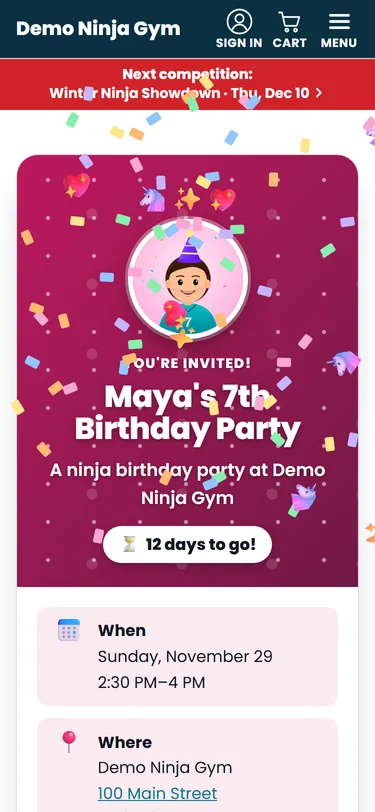
The moment a guest opens it. Sample data.
Parties that book and pay themselves
A party page on your website where a parent books in a few minutes on a phone, without a phone call or a back-and-forth email.
- New: a step-by-step pop-upBook a party opens the booking over your party page: Day, Room and Time, Party, Add-ons, Your Details. Next says where it goes, the numbered steps jump back, and the calendar names holidays and closures.
- It remembersA parent who closes it, or comes back from the payment page, picks up where they left off, with their day, room and time still held.
- Your packages, your pricesA smaller and a larger party, each with its own price, guests included and price per extra child.
- Food and extrasPizza priced each, goodie bags per guest, drinks at one price. Families pick quantities when booking and can change them until your cut-off; the run sheet lists the food to prepare.
- Only times that are freeStart times, how many parties can run at once and how many days' notice you need. Booked times disappear from the page.
- A deposit now, the rest automaticallyThe family pays the deposit at booking and agrees to the balance being charged to the same card a few days before the party. They get an email first, and can pay it early with Pay the Balance Now.
- Every locationSeveral gyms? Each location has its own packages and times, and each party shows its own location's address and phone.
- Booked by phone tooStaff add a party in the back office with Add a Party, and the family gets the same invitation and party page.
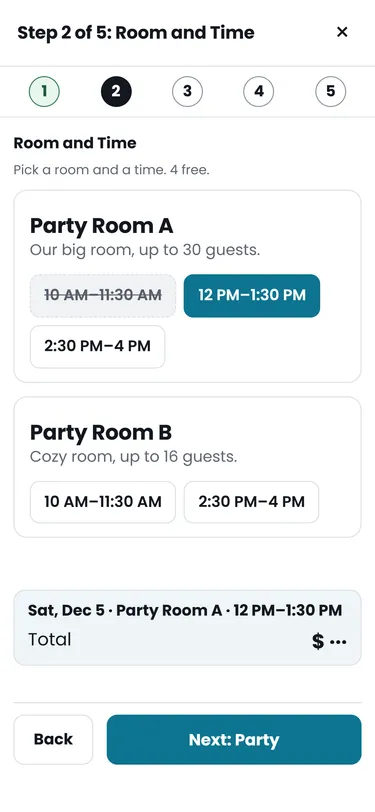
The booking pop-up, step 2. Sample data.
RSVPs and waivers, in one tap
The waiver is where most party days go wrong: parents signing on a clipboard at the door while the clock runs. With the Party Hub they sign before they arrive.
- A link for every partyThe birthday family shares it however they like: text, email, WhatsApp, or printed invitations with a QR code.
- Count Us In or Can't Make ItA guest parent adds their children and any allergies. One tap more opens your waiver with their details already filled in, and brings them back to the party when they're done.
- Already signed? Nothing to doChildren with a waiver on file show as covered.
- Contact details stay privateThe birthday family sees the children's names, waivers and allergies, never other parents' email addresses or phone numbers.
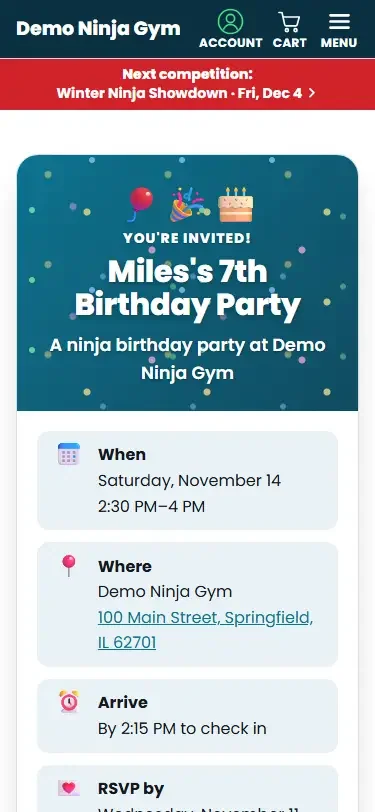
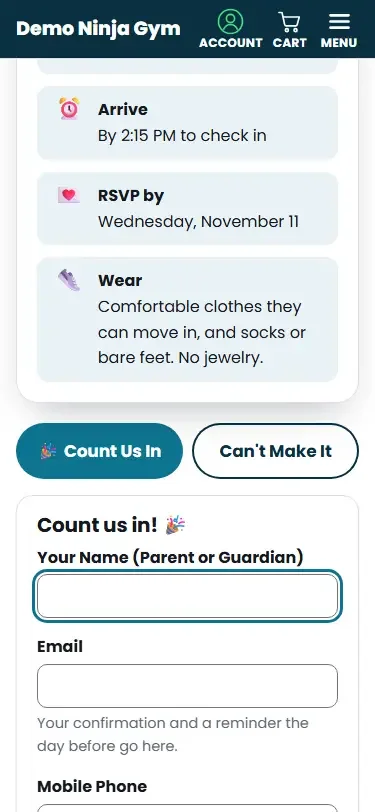
Their own party page, live as guests answer
No more "who's coming?" texts to the gym. The family sees it all in My account and on their party page.
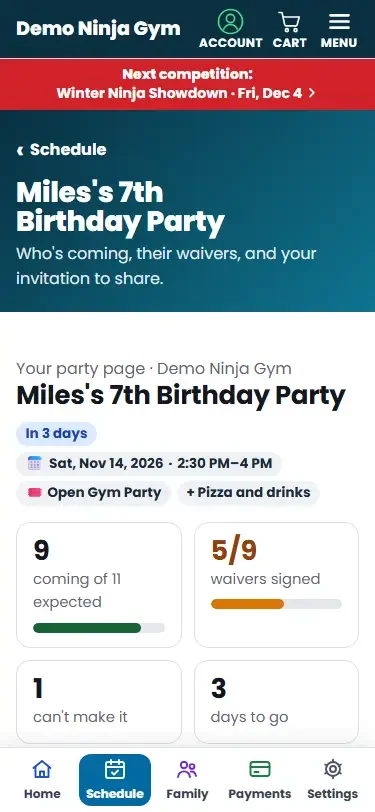
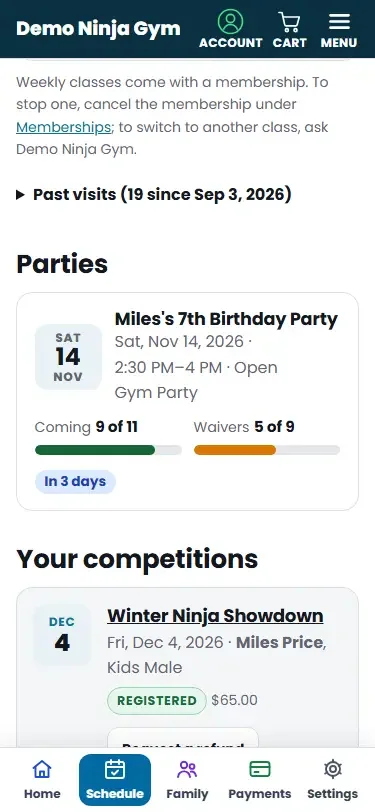
Screenshots with sample data.
Run the party from a tablet
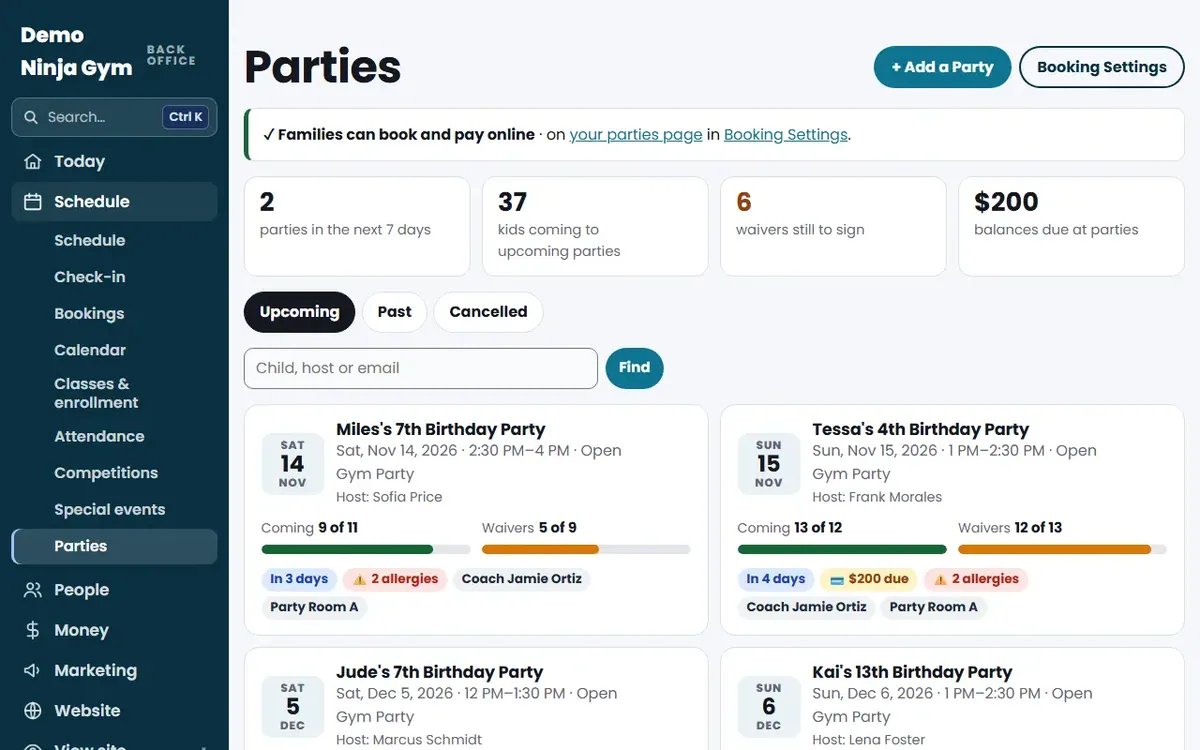
Schedule > Parties lists every party with Coming and Waivers bars. Open one and everything your coach needs is on one screen.
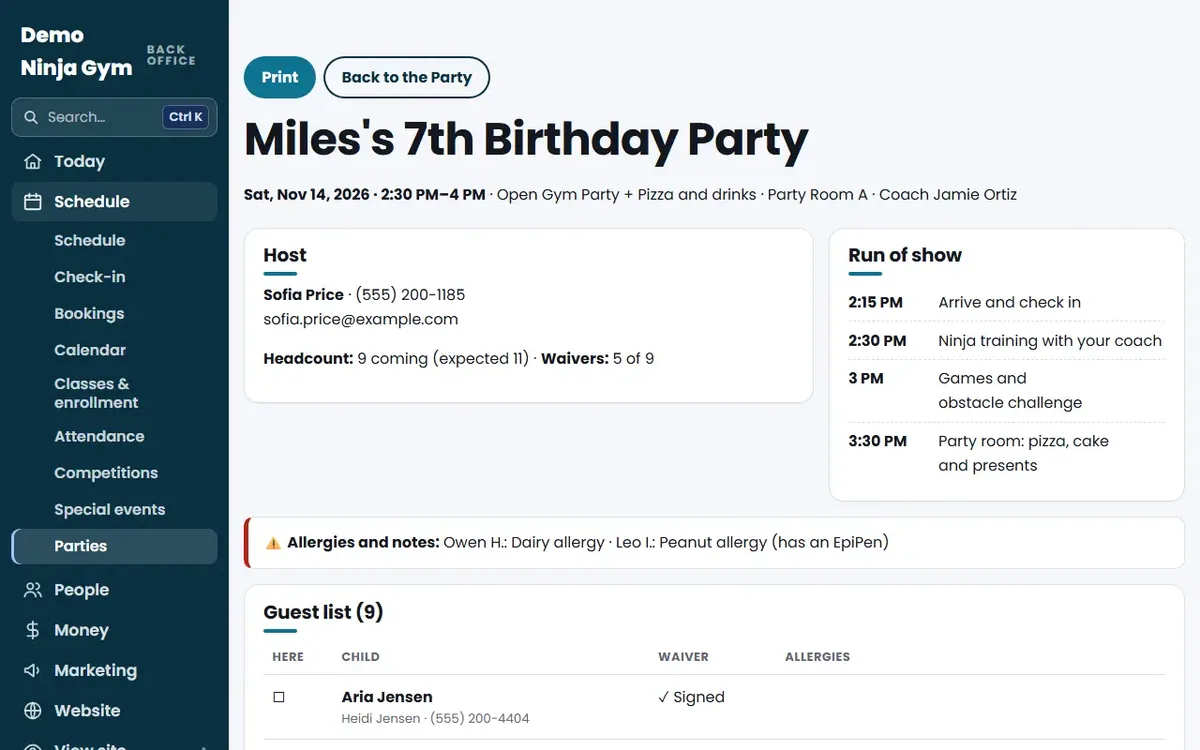
- Allergies firstChildren with allergies or notes are at the top of the guest list, so the coach sees them before the first snack.
- Check in as they arriveTap Here for each child. A walk-in gets added in seconds, and a missing waiver is flagged with a reminder button.
- A one-page run sheetArrival, gym time, the party room and the guest list with allergies, printed or on a phone.
- On the front deskToday's parties show as Party check-in on the front desk screen, so desk staff can check guests in too.
- The morning listStaff get the day's parties by email at 7 AM: who, where, how many and what to prepare.
A flyer for every parent who asks
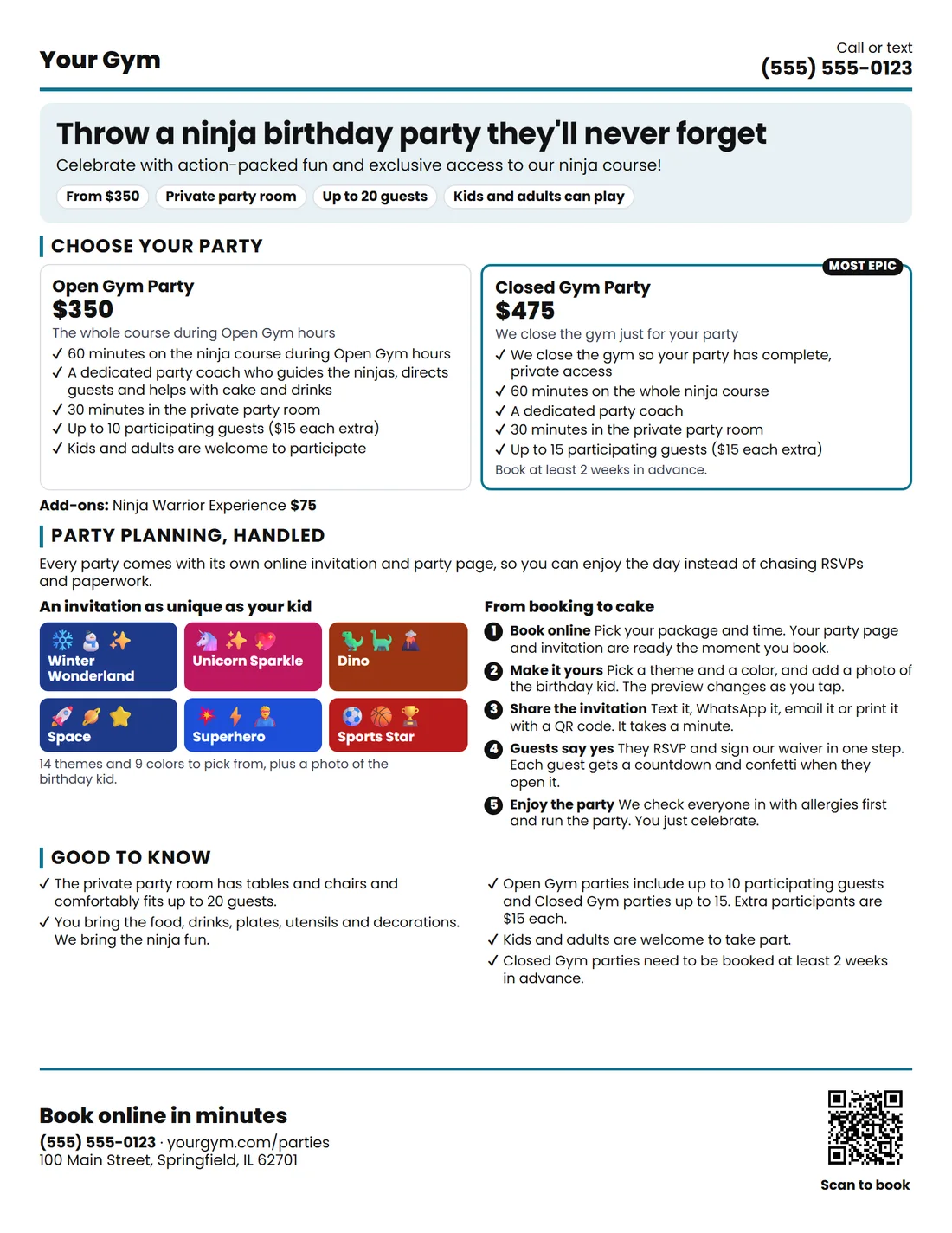
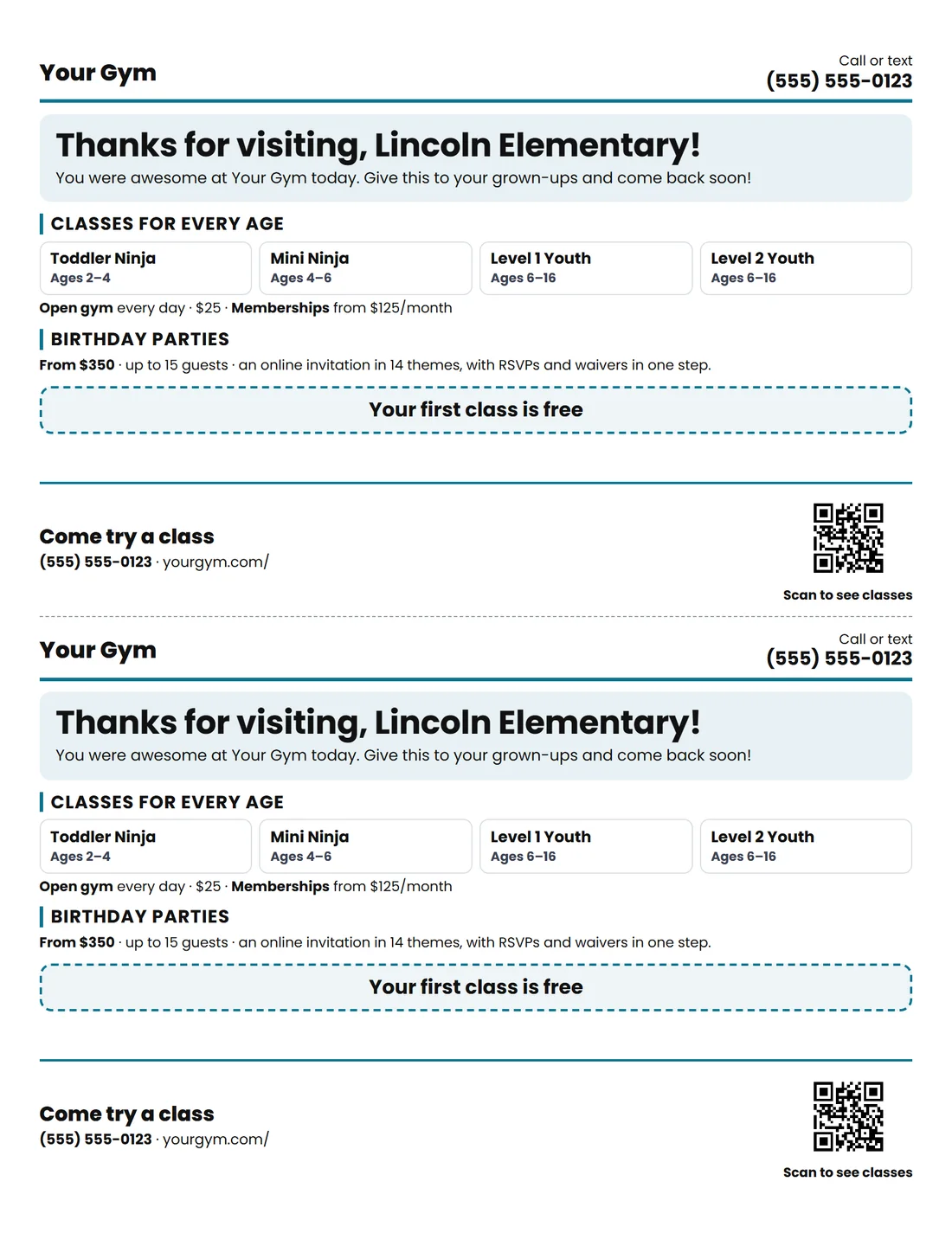
Marketing > Flyers makes a one-page flyer from your website, so the prices and packages are always right. Pick what it's for, change anything you like, and print it or post it.
- PartiesYour packages and prices, the invitation themes, the steps from booking to cake and a QR code to book. Keep a stack at the front desk.
- Field trips and school visits"Thanks for visiting, Lincoln Elementary!" with your classes, camps and parties, for every kid to bring home to their grown-ups.
- What's coming up, ready to goYour camps and events, school breaks near you and the season (Thanksgiving, winter break, gift cards, Valentine's, summer camp) come first, already worded. A camp's dates and price fill in by themselves.
- Your look, your photosTap through seasonal designs, layouts and colors (your own first), add a photo from your phone and tap what stays in view. Every change saves itself.
- Print it or post itFull or half pages, Letter or A4, color or ink saver, a PDF for the print shop, and the same flyer as an Instagram post, story or Facebook picture.
- An offer and a codeAdd "Your first class is free" and one of your discount codes, and see how many families used it.
- A reminder when it mattersToday reminds you before a field trip and a few weeks before a camp or holiday. Or ask your AI assistant to make the flyer for you.
Everyone hears at the right moment
Change the words in Parties > Booking Settings. Every email is in your gym's colors and comes from your gym.
For the birthday family
Their booking confirmation with the party page, each RSVP as it comes in, a reminder when the final headcount is due, and reminders 14, 3 and 1 days before with the guest count.
For guests
A confirmation when they say yes, a waiver reminder 2 days before if one is missing, and a reminder the day before with the address and arrival time.
The come-back offer
The morning after, guest families who asked for news get one friendly offer, such as a free trial class. Nobody else does.
Every party, one screen
Bookings > Parties shows what's coming, what's missing and what's owed, and a day as a calendar with a column per party room.
- Filters that answer questionsThis weekend, next 7 days, balance due, waivers missing, allergies, and by room, start time, package or coach. As a grid of cards or a table, remembered for each staff member.
- A calendar by roomBooked parties and open times side by side. Tap an open time to add a party there, with the date, time and room filled in.
- Moves that can't double-bookMoving a party checks the date, the room, every room's bookings (online ones too) and your closed days, says what's in the way, and can email the host the new time.
- Confirmed, then ArrivedMark a party Confirmed after your call, and Arrived when the family walks in.
- Your cancel ruleSet how many days before counts as a late cancel. A late cancel keeps your fee from what was paid; a refund can go to the family's account credit with no card fees.
- Check-in at the front deskToday's parties sit at the top of Check-in: guests marked Arrived, children added at the door, and a waiver QR code for anyone who hasn't signed. See check-in
- Easier booking for familiesStart times as buttons under Morning, Afternoon and Evening, the next free day when one is full, and your cancel rule right under the pay button.
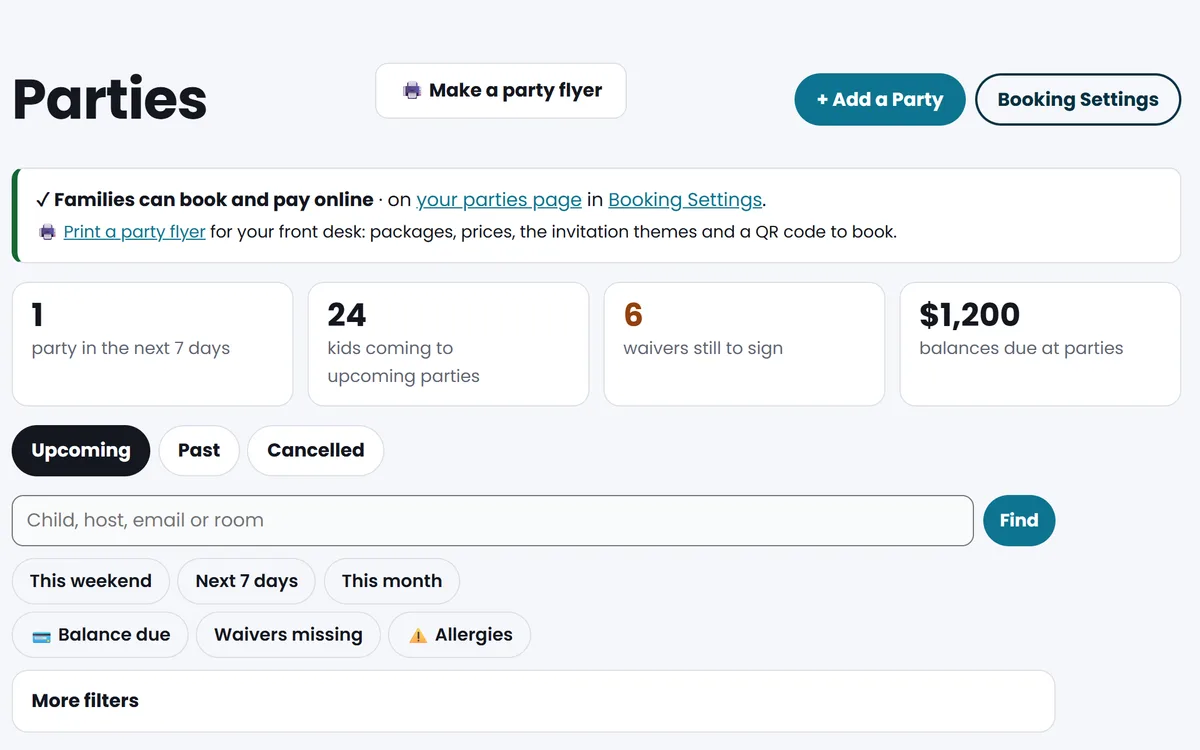
Bookings > Parties. Sample data.
Every party turns into new families
A ninja birthday party puts ten to fifteen new families in your gym. The Party Hub makes sure you can reach them again.
Birthday guest lists
Money > Reports lists every party's guests with their waivers and who said yes to news, ready to download. One button emails those families a free trial class offer.
Photos and Google reviews
Coaches add party photos; the family gets them with a friendly request for a Google review.
Party coaches and bonuses
Pick the coach for each party and track party bonuses in their hours.
Payments, refunds and tips
Deposit, balance and every payment on the party's page. Families can add a tip when they pay the balance, staff add one at the desk, and tips go to the party's coaches, apart from sales.
Private by design
Allergies are sealed in the database. Hosts never see other parents' contact details, and no outside trackers run on party pages.
The Party Hub, answered
Do parties have to be booked online to use the Party Hub?
No. Staff add a party booked by phone, in person or from a request with Add a Party, and the family gets the same invitation and party page as an online booking.
Can the birthday family choose how the invitation looks?
Yes. Under Make it yours on their party page they pick one of 14 themes (four of them seasonal), one of 9 colors and, if they like, a photo of the birthday kid. The invitation, the RSVP page, the printed invitations and the party emails all match. Until they choose, invitations are in your gym's colors.
Is the birthday kid's photo private?
It's stored on your own site, never with an outside service. The camera details and location are removed, only people with the invitation link can see it, it's never in an email or on search engines, and it's deleted 30 days after the party. The family can remove it any time, and so can your staff.
How do guests sign the waiver?
When a parent says yes on the invitation, the next tap opens your waiver with their name, email, phone and children already filled in. After signing they come straight back to the party. Children who already have a waiver on file show as covered.
Can the birthday family see other parents' phone numbers or emails?
No. They see the children's names, whether each waiver is signed and any allergies the parents shared. Contact details stay with you.
How is the balance collected?
The family pays a deposit when booking and agrees to the rest being charged to the same card a few days before the party (3 unless you change it). They get an email first. If the card is declined they get a link to pay, and you can charge it now or stop it and collect it at the desk.
We have several locations. Does each party show the right address?
Yes. Each party belongs to one location. Its invitation, emails, the family's party page and the run sheet show that location's name, address and phone.
How do tips work?
When the family pays the balance online they can add 15, 18 or 20% or their own amount; staff can add a tip on the party's page at the desk or on the register. Tips are kept apart from sales, never taxed, and split between the party's coaches for payroll.
Who gets the free trial offer after a party?
Only guest families who ticked the box to hear news from your gym. It goes once, the morning after the party. You can change its words and its link, or turn it off.
Keep exploring
Give your gym the HQ it deserves
Give us your current website and we build your new one, free to explore. No payment before you approve launch. Prefer a walkthrough? Request a 30-minute demo with a Ninja HQ expert.