Moving to Ninja HQ, step by step
We build your new website from the one you have. Then you bring your members, contacts and account balances across with a test run first, nobody is charged until their next payment date, and every old link lands on the right new page.
What moves, and where
Four screens for the move
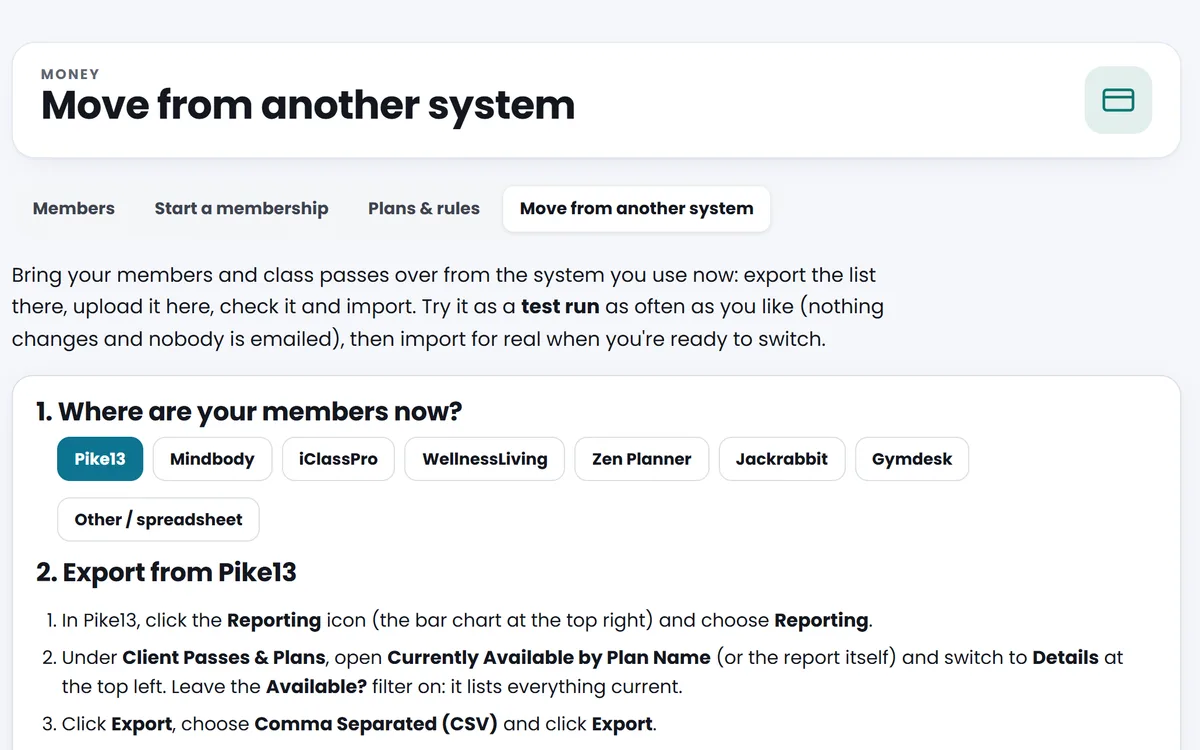
- 1. Move from another systemUnder Money > Memberships.
- 2. Pick your systemSteps to export from it, then upload, check and import.
- 3. Import contactsYour customer list, from any spreadsheet.
- 4. Account balancesMoney families still have with you, brought across.
- 5. RedirectsEvery page of your old site sent to the right new one.
The moving screens. Sample data.
A video from a demo gym with sample data.
Try it before you switch anything
1. Your free preview
Send us your website. We build the new one from it: logo, colors, classes, prices, coaches and photos.
2. Review and connect
You look it over, connect your own Stripe account, and we take a "before" snapshot of where you show up in search.
3. Launch
We move your domain with every old page redirected, then check search, email and payments.
Your site stays in test mode until you approve launch, and billing starts at launch (pricing).
Members and passes, without a gap in billing
- From the system you usePike13, Mindbody, iClassPro, WellnessLiving, Zen Planner, Jackrabbit, Gymdesk or a spreadsheet.
- Export, upload, checkA preview shows every member and matches their plan to one of yours.
- A test run firstAs often as you like. Nothing changes and nobody is emailed.
- Import for realNobody is charged until their next payment date, and running it again is safe.
- Switch-overWhen you press the button, each family gets an email to add a card, with a reminder two days later. Then you stop billing in the old system.
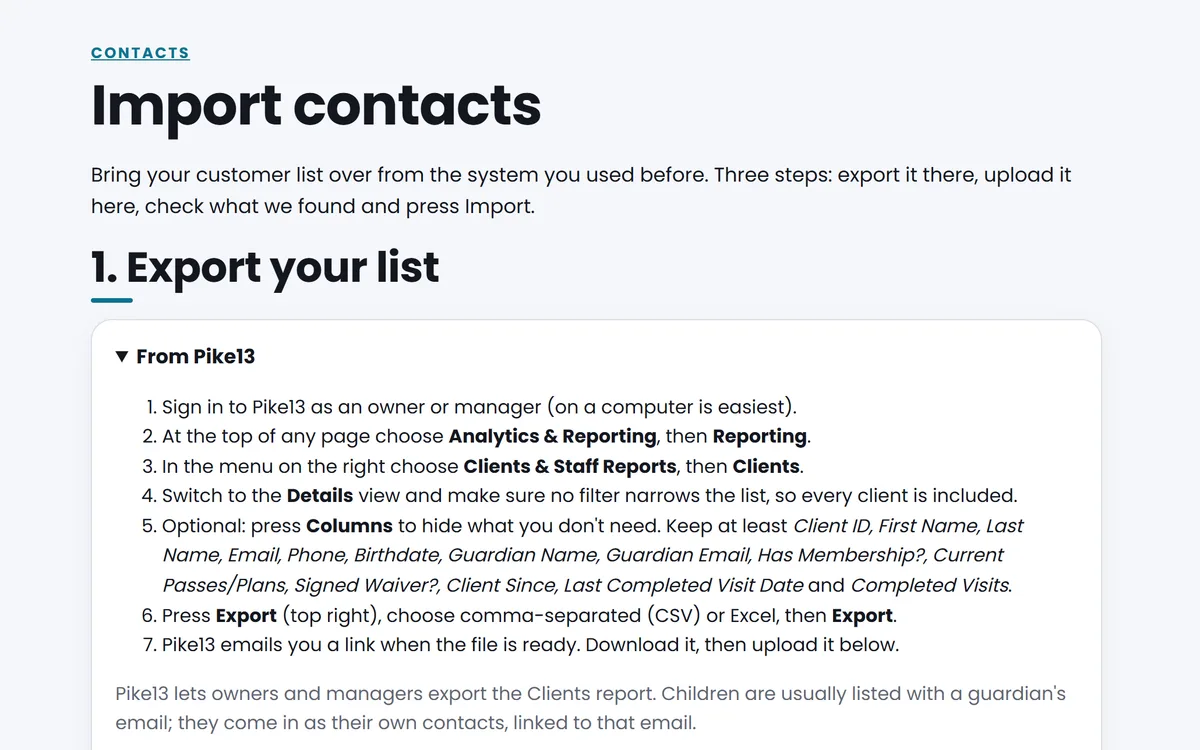
Import contacts. Sample data.
Bring the rest across
- ContactsAny spreadsheet. Nobody is emailed, nobody is signed up for news unless your file says they agreed, and an import can be undone.
- Classes from iClassProPaste your portal link: days, times, ages, tuition and open spots come across. No family data is read.
- Account balancesBring Mindbody account balances across as account credit; families aren't emailed.
- RedirectsWe scan your old site and match each page to its new one; you confirm each match.
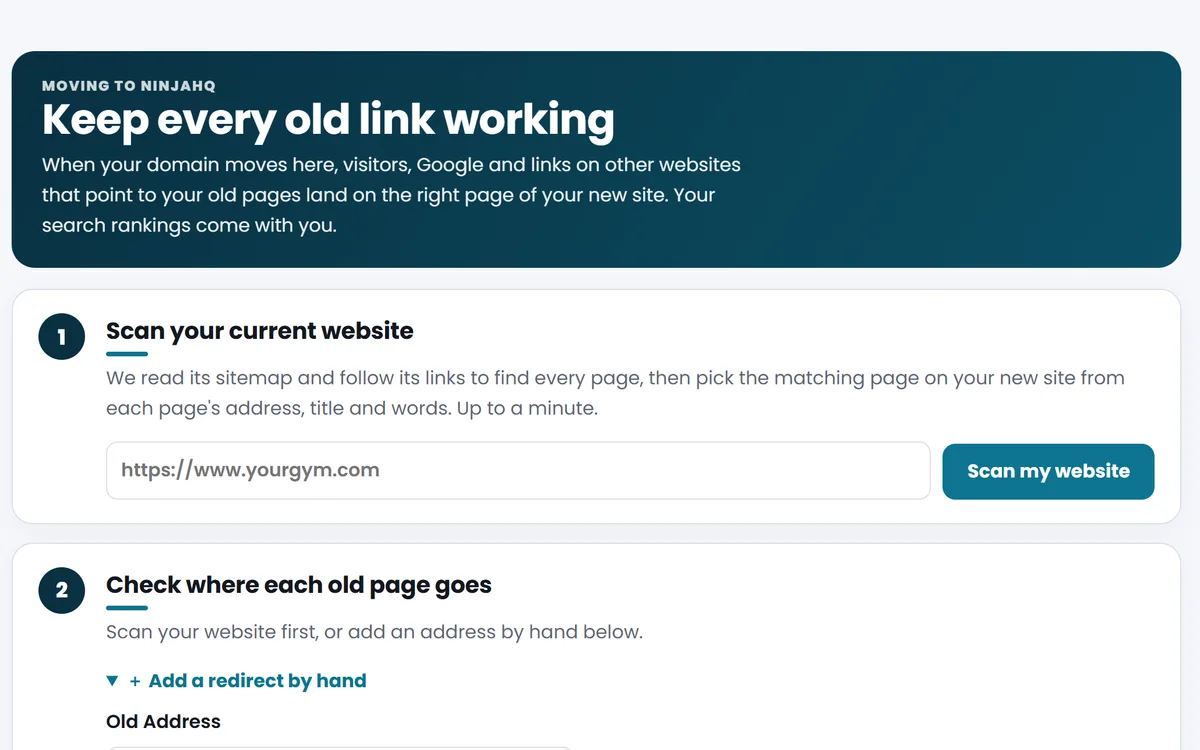
Keep every old link working. Sample data.
Switching, answered
Do families' saved cards move?
No. Saved cards stay with your old payment processor, so at switch-over each family gets an email to add a card. We plan the timing with you.
Will anyone be charged twice?
No one is charged by Ninja HQ until their first payment date here. You stop billing in the old system once families have added their cards.
Do you take bank (ACH) payments?
Not yet. Payments are by card through your own Stripe account.
Is my system listed?
Choose Other / spreadsheet. Any CSV or Excel export works for members and contacts. Comparisons with each system are on Compare ninja gym software.
You've seen every feature
Give your gym the HQ it deserves
Give us your current website and we build your new one, free to explore. No payment before you approve launch. Prefer a walkthrough? Request a 30-minute demo with a Ninja HQ expert.