How do I see who is coming to class today?
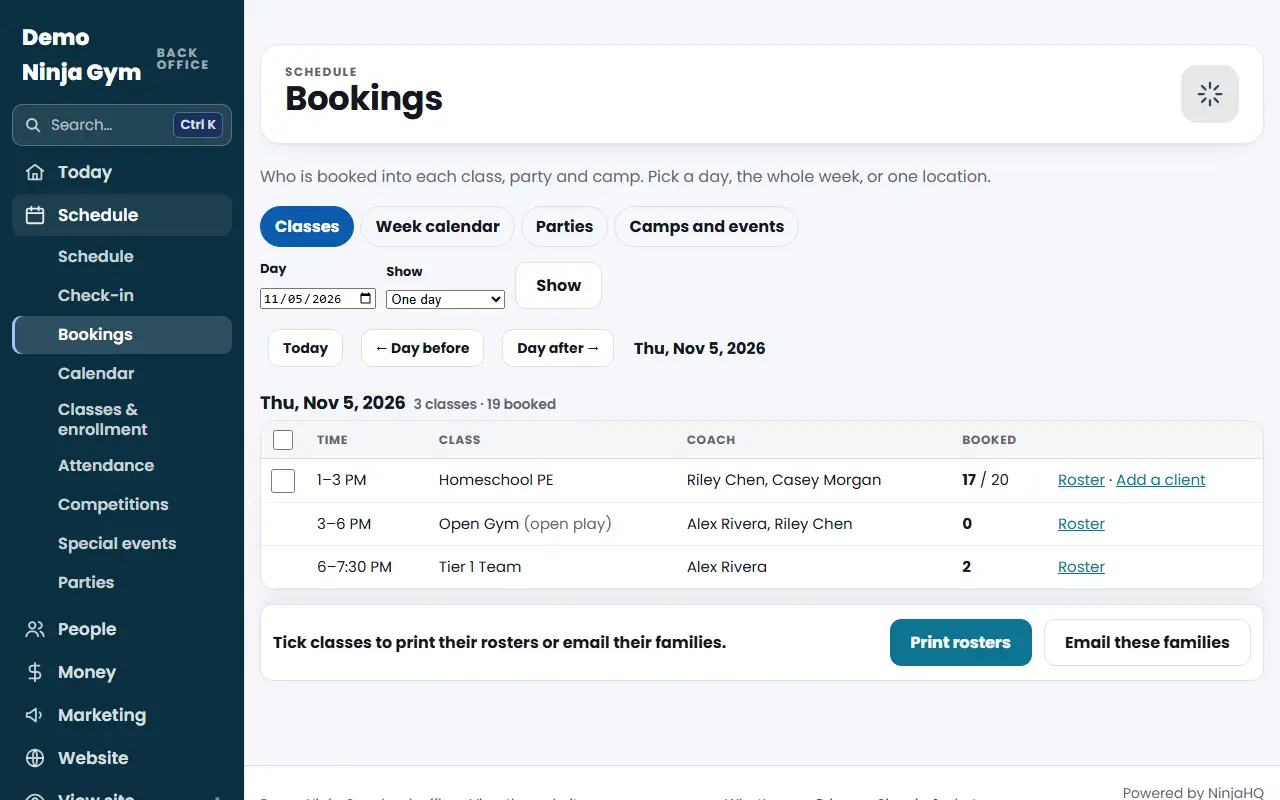
Open Programs > Bookings, pick the day and read Booked. Press Roster for each athlete, parent and phone. The Week calendar shows the whole week.
Bookings is the page to open each morning. It lists every class, party and camp with how many are booked.
Before you begin
- Everyone on staff, including the front desk, can open Bookings.
- Families show up here once they book a class, trial or drop-in, or you add them.
Steps
- Open Bookings. It opens on the Classes tab and today.
- To change the view, use Day, Show (One day or The whole week) and, if you have several locations, Location, then press Show. The Today, Day before and Day after buttons step through dates.
- Read each row: Time, Class, Coach, and Booked (the number booked, with the capacity or "n open" when known).
- Press Roster on a class to see Who is coming: the athlete, how they booked, the parent and the phone. A waitlist, if there is one, is listed under it.
Other tabs
- Week calendar: Monday to Sunday as cards, color-coded for classes, open play, camps and parties, with booked and open spots. Cancelled classes are struck through.
- Parties: one day by room, or a whole week as a list. Open party times nobody booked show as Available, and the Waivers column shows how many guests signed.
- Camps and events: camps and events with online sign-up and how many signed up each day.
What you'll see
On the roster, "Booked as" tells you if someone is enrolled monthly, on a free trial or a drop-in. A membership on hold or with a failed payment is marked there too. Athletes staff added show "added by staff, pays at the desk."
Troubleshooting
A class shows 0 booked. Nobody has booked it for that date yet. Walk-ins can be added from the roster (see the walk-in article).
A class is missing. Check the Location filter, and that it is on the Schedule for that day. A closed day shows no classes.
Questions
Who counts as booked?
Monthly enrollments, paid sessions, free trials, drop-ins and athletes staff added that day.
Can front desk staff use this page?
Yes. Front desk staff can see Bookings, open rosters, print and add a walk-in. Cancelling a class and emailing families are for owners and managers.
Where do I check people in?
At Front desk > Check-in. Bookings shows who is expected; Check-in records who actually came.