New · NinjaHQ Assistant

Run your gym just by asking

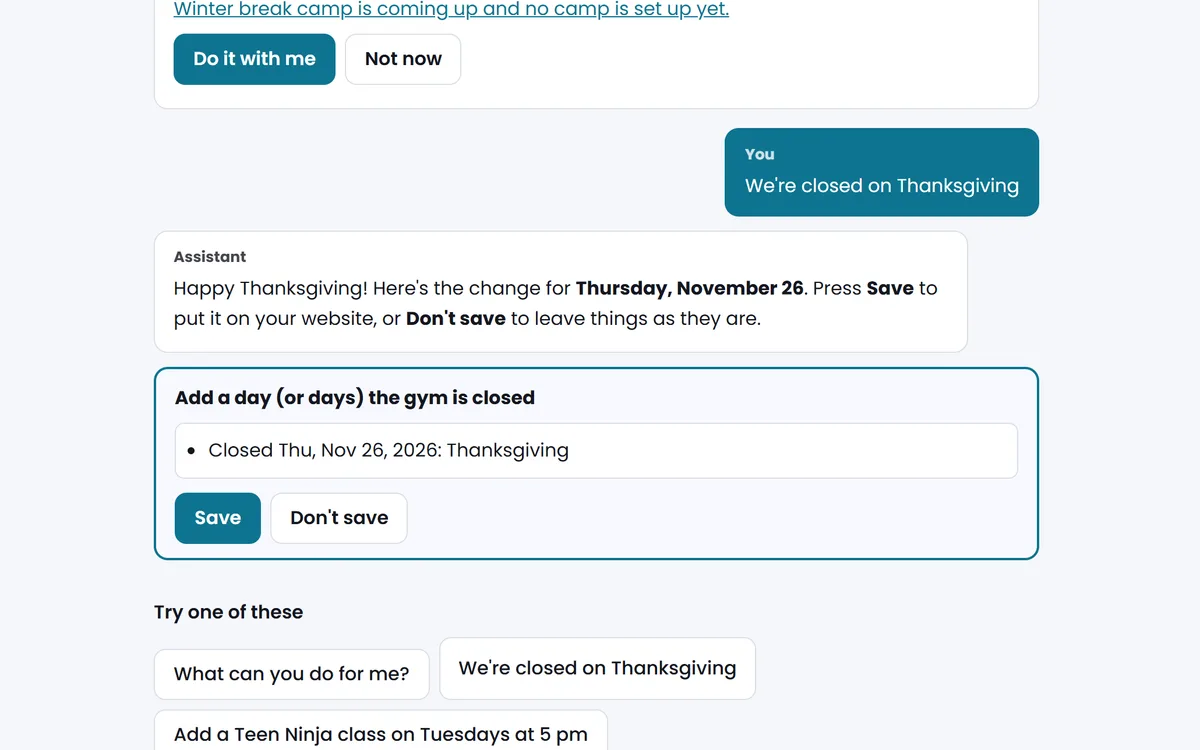
NinjaHQ Assistant is built into every gym's back office. Type what you need in plain words: "We're closed on Thanksgiving." "Add a Teen Ninja class on Tuesdays at 5." It looks things up, gets the change ready and waits for you to press Save. Prefer the AI you already use? Connect ChatGPT or Claude instead.

NinjaHQ Assistant: the owner says the gym is closed on Thanksgiving and a card shows the change with a Save button (sample data)
Watch it

Ask, check, press Save

NinjaHQ Assistant

Right under Today in your menu

  • 1. See what's coming upA To do list: holiday hours, Black Friday promotions, camps, codes about to end.
  • 2. Ask in plain wordsOr press Do it with me on a to-do.
  • 3. Check the cardEvery change shows what will change before anything is saved.
  • 4. Press SaveOr Don't save. Saved changes can be undone from History.
  • 5. Ask from any screenPress Ask next to Help: it already knows the page you're on.

NinjaHQ Assistant in a demo gym. Sample data.

Built in

Say it like you'd text a helper

"We're closed on Thanksgiving"

The schedule, closures, opening hours and bookable classes.

"Update Coach Sam's bio"

Coaches, special events, photos and the words on your website.

"Raise the party price to $325"

Party prices, membership plans, class packs, products and discount codes.

"What should I change on my website?"

Visits against last month, heatmaps, booking steps, menu use, forms and speed, turned into changes with the numbers behind them. How it works

"How do I refund a party?"

Answers from the Help Center, with the steps and a link to the right screen.

Ask about the page you're on

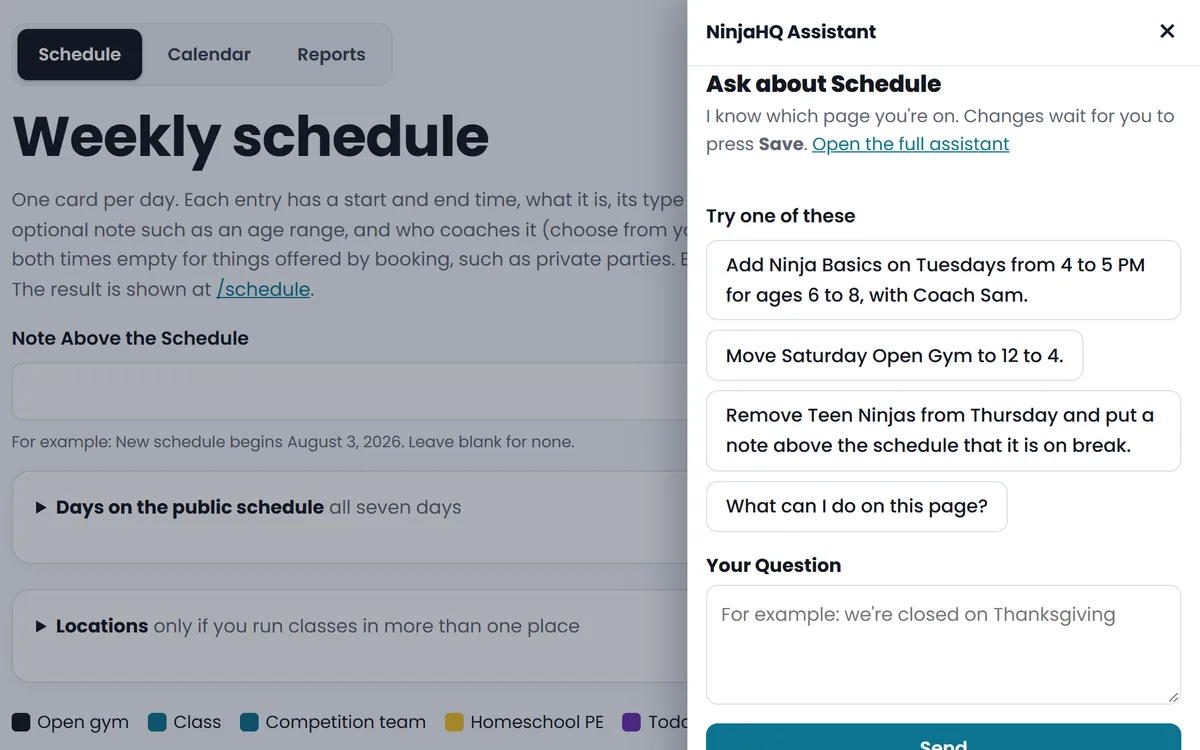
Every back-office screen has an Ask button next to Help. The assistant opens beside the page, already knows where you are and suggests questions from that screen's help articles. Save a change there and the page refreshes to show it.

A back-office screen with the Ask panel open beside it, suggesting questions about that page (sample data)

The Ask panel on Reports. Sample data.

Remembers and reminds

It knows your gym, so you don't repeat yourself

  • Notes you choose to keepTell it "we close at 2 on summer Sundays" and press Save. It uses that in every chat. See and forget any note under What I remember.
  • Earlier chatsA few lines about each chat, kept 90 days, so "like last time" just works.
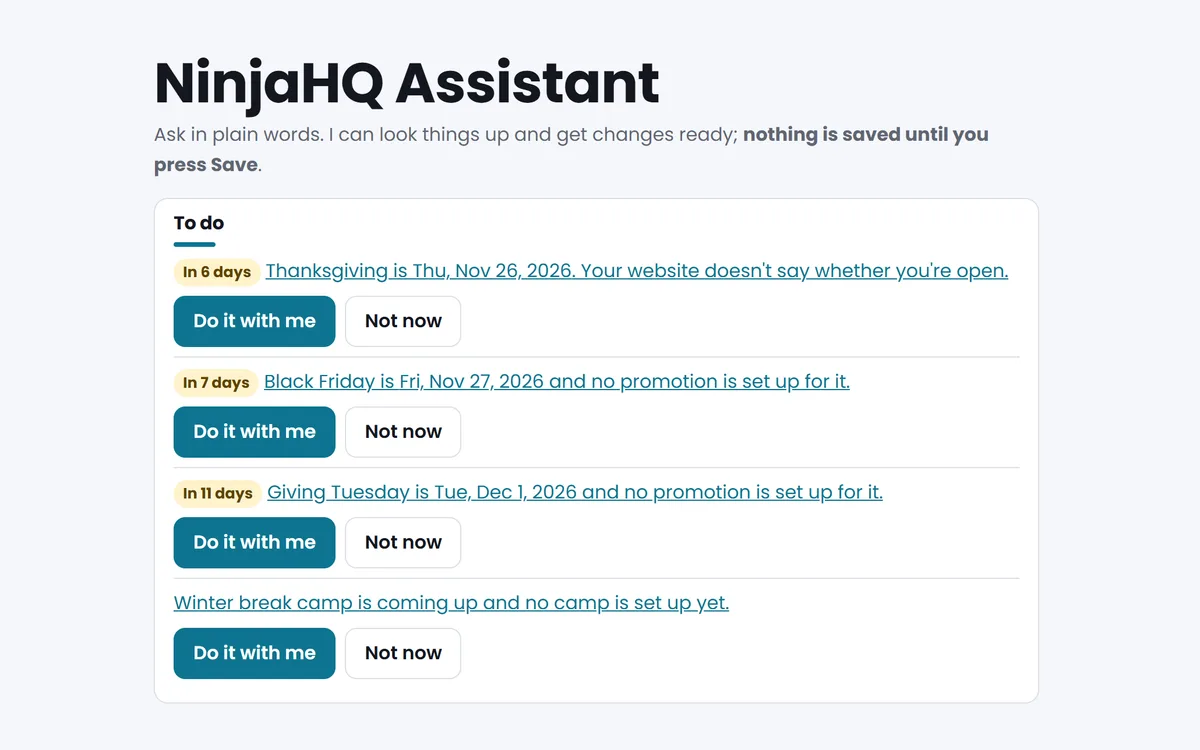
  • A To do listHoliday hours your website doesn't mention, Black Friday or Giving Tuesday without a promotion, camp season with no camp, codes about to end.
  • Reminders"Remind me Friday to post the camp flyer" shows on Today that day.
  • In your Monday emailThe weekly summary lists its suggestions under Needs you.
The assistant's To do list: Thanksgiving hours, Black Friday and Giving Tuesday promotions, each with Do it with me (sample data)

The To do list. Sample data.

Your own AI

Or chat from ChatGPT or Claude

Connect the AI you already use to your gym once, in about two minutes, and it gets the same tools with the same safety rules.

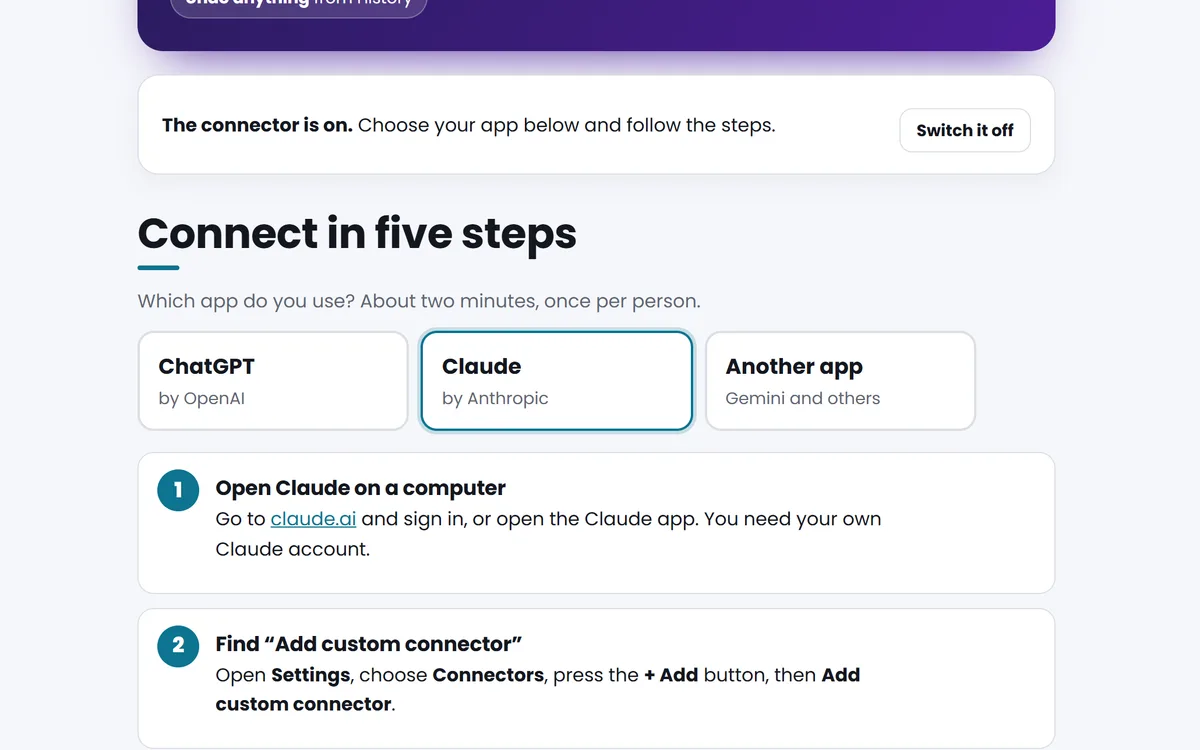
  • 1. Open AI assistantIn your back office, under Settings › Connections.
  • 2. Pick your appChatGPT or Claude, with steps for each. Another app that takes a custom connector works too.
  • 3. Add the connectorCopy two lines into your AI app.
  • 4. Sign in and say yesType your gym's website and the code we email you.
  • 5. Start a new chat and askThe way you'd text a helper.

Connecting Claude. Sample data.

Which to use

Pick by the job, or use both

Built in

NinjaHQ Assistant

Best for
Everyday changes and questions, right in the back office
Set up
Nothing to set up
Knows your gym
The page you're on, notes you keep, earlier chats, a To do list and reminders
Photos
Sends you a link to upload photos
Changes
A card for each change; nothing is saved until you press Save
Cost
Built into Ninja HQ, with a monthly allowance per gym
Try it in the demo gym (opens in a new tab)

Bring your own

Your own ChatGPT or Claude

Best for
Long, many-step jobs: a whole class schedule, several pages, a big tidy-up
Set up
About two minutes, once per person
Knows your gym
What you tell it in that chat
Photos
Attach photos in the chat; ChatGPT can draw avatars
Changes
It says what will change and asks first
Cost
Your own ChatGPT or Claude plan, with custom connectors
How to connect yours

Either way: the same tools and rules, every change in History to undo, and no access to payments, refunds or cards.

Not sure? Ask NinjaHQ or read which assistant to use. Web developer or IT? Every tool, schema and example is in the developer docs.

Safe by design

You decide, and you can undo anything

  • Nothing saves by itselfNinjaHQ Assistant shows every change as a card and waits for your Save. ChatGPT and Claude say what will change and wait for your yes.
  • Every change in HistoryWith who asked and from which assistant. Owners can put the old version back.
  • Money stays with youNo assistant can take, charge or refund payments, or change Stripe, sales tax or QuickBooks.
  • Totals, not familiesThe tools show totals, never customers' names, emails, phone numbers, orders or waivers.
  • It can't sendNo emails or texts go out from a chat. An email is only ever saved as a draft for you to send.
  • Owners and managers onlyFront desk, Staff and view-only sign-ins can't use it, and owners can turn it off.
The five connection steps for Claude, with the two lines to copy (sample data)

Connecting your own AI. Sample data.

Try it now

Ask us anything, or click around a demo

Ask NinjaHQ

Questions about Ninja HQ, answered from our Help Center and website. Open Ask NinjaHQ

The demo gym

A full gym website and back office with sample families, NinjaHQ Assistant included. demo-gym.ninjahq.ai (opens in a new tab)

The demo league

Competitions, registration, live results and rankings. demo-league.ninjahq.ai (opens in a new tab)

Questions

AI assistant, answered

What AI does NinjaHQ Assistant use?

Claude, from Anthropic, through our servers. What you type and what your gym's tools answer go to Anthropic to work out the reply. It doesn't use them to train its AI. Your chat is deleted 30 days after you last use it, and a few lines about it after 90 days.

Does it see my families' details?

The tools it uses show totals: visits, membership numbers and registrations. They never show a customer's name, email, phone number, orders or waivers. Notes it keeps are about your gym, never about customers.

Is there a limit?

Yes, a monthly allowance per gym. The assistant's page shows how much of it is used, and it starts again on the 1st.

Which AI apps can I connect instead?

We test ChatGPT and Claude. Any app that accepts a custom connector with sign-in, like Gemini, can use the "Another app" steps. Your AI plan needs custom connectors: ChatGPT has them on Business, Enterprise and Edu plans, and some Claude plans don't include them.

Can my staff use it?

Owners and managers can, each with their own sign-in. Managers can't change membership plans, contact details, redirects or tuition rules. Front desk and Staff sign-ins can't use it.

What if it gets something wrong?

You see every change before it's saved. If something still isn't right, open History and put the old version back, or ask the assistant to undo it.

Do I have to use it?

No. Everything it does can be done in the back office by hand, and owners can turn it off.

Ready when you are

Give your gym the HQ it deserves

Give us your current website and we build your new one, free to explore. No payment before you approve launch. Prefer a walkthrough? Request a 30-minute demo with a Ninja HQ expert.

Ask NinjaHQ

Answers from our Help Center and website

Ask anything about NinjaHQ, or try:

AI answers from NinjaHQ's own pages and can make mistakes. Your questions are sent to Anthropic, the AI company, to answer; NinjaHQ doesn't keep them. Privacy