How do I add a party booked by phone or from a request?
In Parties, press Add a Party. Enter the date, time, package, birthday child and host. The family gets their party page and invitation link by email.
Parties booked by phone, in person or from a request get the same party page, invitation and guest list as an online booking.
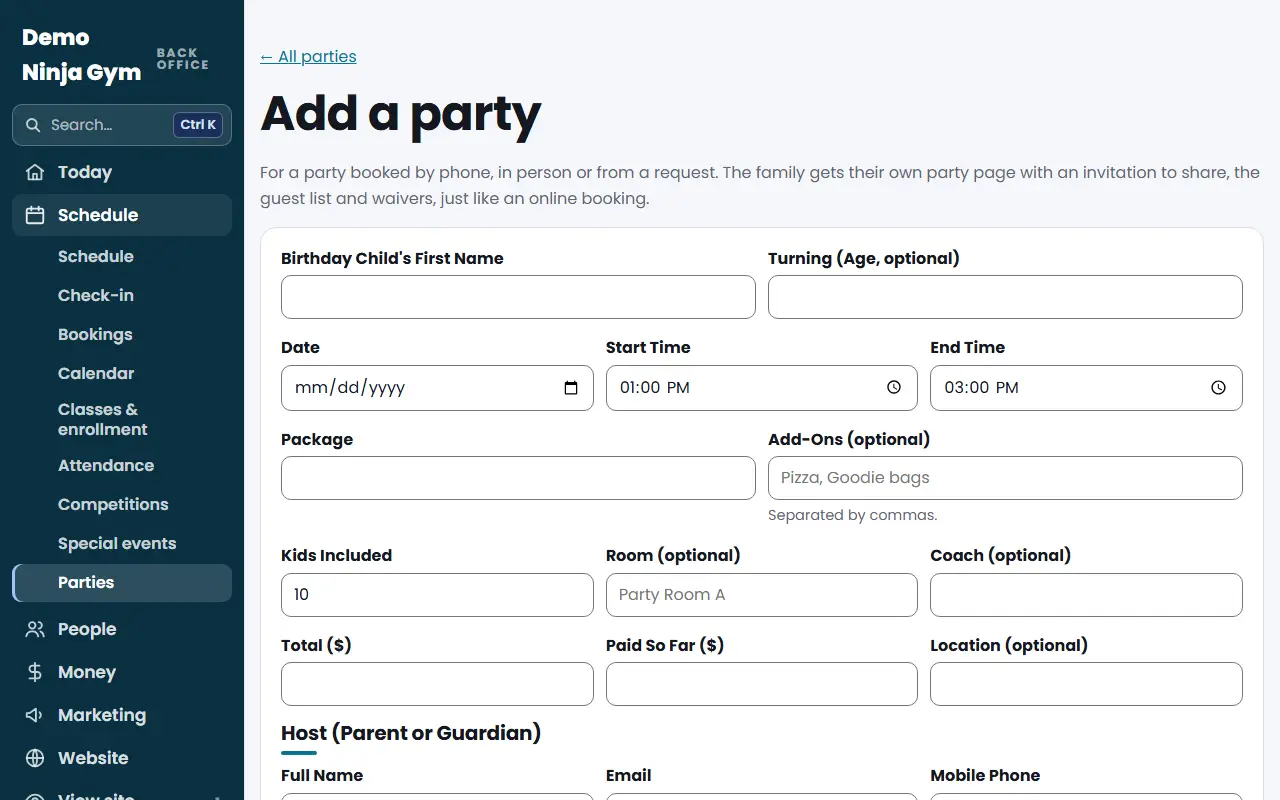
Steps
- Open Parties and press + Add a Party.
- More than one location? Choose the Location first: the invitation and emails use its address and phone.
- Enter the birthday child's first name and the age they're turning.
- Choose the date, start time and end time, then the package, any add-ons and how many kids are included.
- Add the room and coach if you know them, and the total and what's been paid.
- Enter the host's full name, email and mobile phone.
- Leave Email the host their party page and invitation link now on, and press Add the Party.
- The party opens. Its invitation link is ready to share, and the family gets an email with their party page.
Questions
Does the family pay through this?
No. Enter the total and what's been paid so far, and the balance shows on the party. Record more payments on the party's page as they come in.
Can I add it without emailing the family?
Yes. Switch off Email the host their party page before you press Add the Party. You can email it later from the party's page.
Related articles
- How do I see every party, who's coming and their waivers?
- How do I run a party on the day: check-in, allergies and the run sheet?
- How do I let families book and pay for birthday parties online?
- How do I create a competition and open registration?
- How do I set which leagues we host, or send families to Ninja Master to register?