What is the NinjaHQ line at the end of competition confirmations?
US families get one short line about NinjaHQ at the end of their competition registration confirmation, once a year. Turn it off on Marketing > Emails.
Families who come to your competitions from other gyms often ask how your registration works. NinjaHQ adds one short line at the end of their confirmation email so they can show it to their own gym:
“Liked registering this way? This sign-up was built for ninja competitions by NinjaHQ. Want it at your home gym? See how it works”
Before you begin
- Only owners can change this setting.
- The line is on unless you turn it off. It starts once an owner of your gym accepts the updated NinjaHQ Platform Agreement.
- Gyms outside the US and white-label gyms never send it, and the card isn't shown to them.
Steps
- Open Emails and scroll to the NinjaHQ line in registration confirmations card.
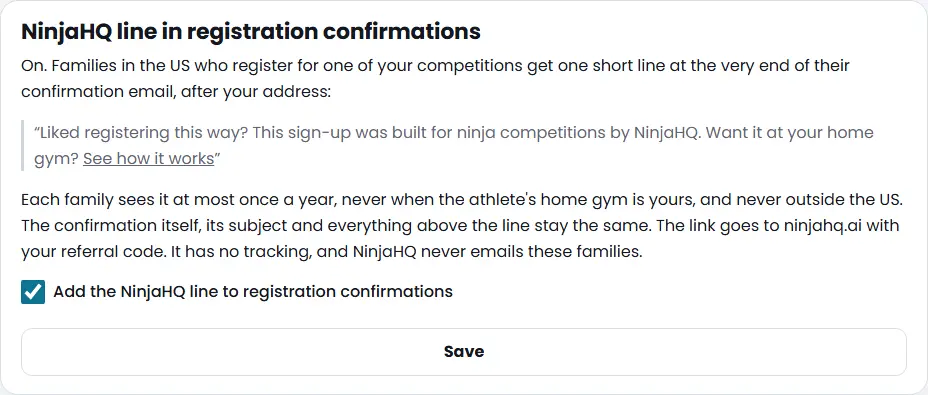
- Tick or untick Add the NinjaHQ line to registration confirmations.
- Press Save.
What you'll see
- The card says whether the line is on, and shows its exact words.
- When it's on, a family registering from the US gets the line at the very end of their confirmation, after your address. A family sees it at most once a year from your gym.
- It is left out when the athlete's home gym is yours, for families outside the US, for a confirmation you send again and for registrations you add yourself.
- The link goes to ninjahq.ai with your referral code. It has no tracking.
- Run order emails, reminders and every other email never carry it.
Troubleshooting
A family outside the US asks about it. They won't get it: the line is only added for families registering from the US.
You switched it on but a confirmation didn't have it. The family may already have had it this year, the athlete's home gym may be yours, or no owner has accepted the updated NinjaHQ Platform Agreement yet.
Questions
Does the line change the confirmation email?
No. The subject, the ticket, the checklist and your address stay exactly the same. The line is the last thing in the email, in small grey text.
Who gets it?
Families registering from the US for a US gym, at most once a year each. It never goes to athletes whose home gym is yours, and never outside the US.
Does NinjaHQ email these families or track them?
No. The link is a plain web address with your referral code and no tracking. NinjaHQ never uses your families' addresses for its own emails.
Why is it on but not showing yet?
It starts once an owner accepts the updated NinjaHQ Platform Agreement that describes it.
Related articles
- How do I turn camp, trial, party and waitlist reminders on or off?
- How do I see and change the emails my website sends automatically?
- How do I use the Community page and invite another gym?
- How do I send an email to my customers or my news list?
- Who can I send news emails to, and how do unsubscribes work?