How do I sign in to My account?
Go to your gym's website, choose My account, enter your email and tick the box, then type the 6-digit code we email you. There is no password to remember.
My account is where you see your registrations, purchases, memberships and waivers. You sign in with a code, so there is no password to remember.
Before you begin
- Use the same email address you gave your gym when you registered, bought something, joined, signed a waiver or were added at the front desk.
- Your phone or computer needs to be able to get email. If your gym has text codes turned on, you can use your mobile phone instead.
Steps
- On your gym's website, choose My account at the top, or go to your gym's website address followed by /account.
- On the Sign in page, type your email in Your Email.
- Tick I'm 18+ or a parent or guardian.
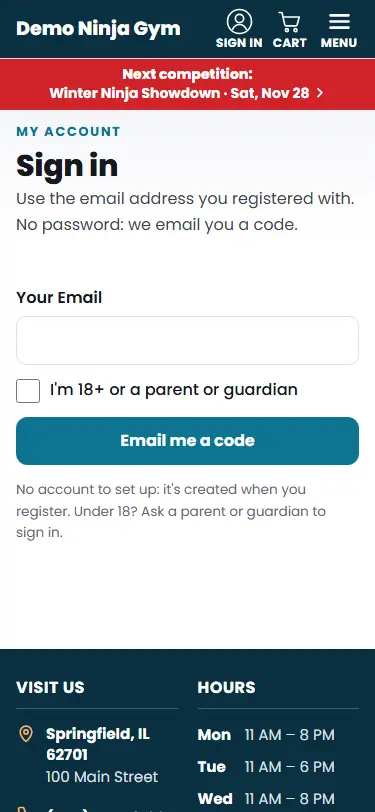
- Press Email me a code. Or, if you see a Continue with Google button and your Google account uses the same email as your gym account, press it instead.
- Open the email and type the six digits in Six-Digit Code. It signs you in as soon as all six digits are in. If the email has a Sign in with one tap button, you can use that, then tap Sign in.
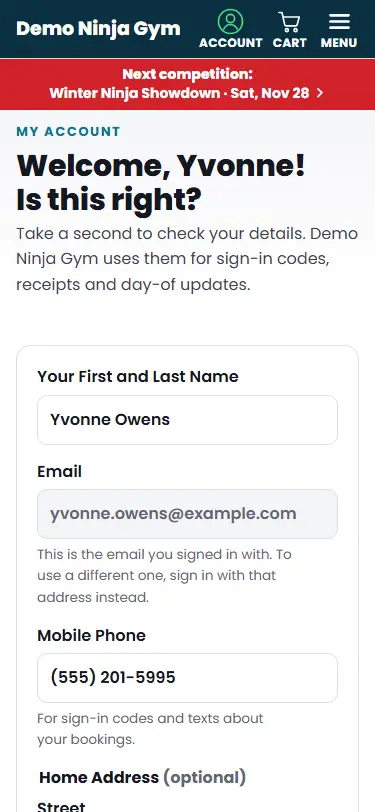
- The first time you sign in, check your details on the "Is this right?" page and press Yes, this is right. See How do I update my details?.
What you'll see
You land on My account, which says "Hi" with your first name. From there you can see what is coming up, your competitions, memberships, purchases and waivers.
Troubleshooting
No code arrived. Check your spam folder. For safety, the page gives the same answer whether or not the email has an account, so a typo looks the same as a real address. Press Send it again, or Use a different email if you think you typed it wrong.
I want the code by text instead. If your gym has texting turned on, a Text me the code instead button appears on the code page. The text is sent to the mobile number on your account.
The code does not work. Codes last 10 minutes and only the newest one works. Press Send it again and use the latest.
Too many codes were requested. Wait 15 minutes, or use the newest code you already received.
I used Continue with Google and it says my email is not found. The Google account's email has to match the one your gym has on file. Sign in with a code to the email your gym has, or ask the gym to add your Google email.
It says the website is not live yet. Until a gym's new website opens, codes are only sent to the gym's staff and test addresses.
Questions
Do I need to create an account first?
No. Your account is created when you register, buy something, join, sign a waiver or are added by your gym. Use the email address you gave them.
How long does the code last?
10 minutes. If you ask for more than one, only the newest code works.
Can a child sign in?
Accounts belong to the adult who registered. Signing in asks you to confirm that you are 18 or older, or the parent or guardian.