How do families book and enroll in classes online?
Families pick a class on your Book a class page and enroll, book a day or a free trial. Manage classes and tuition rules at Programs > Classes & enrollment.
The Book a class page on your website lets families find a class, see the spots left, and enroll or try one. Behind it, Programs > Classes & enrollment is where you keep the classes and the rules for billing them.
Before you begin
- Classes come from your booking system download (for example iClassPro) or an import. See the article on moving your classes over.
- To charge tuition online, connect Stripe in Settings.
- Owners and managers manage the rules.
Steps
See your classes
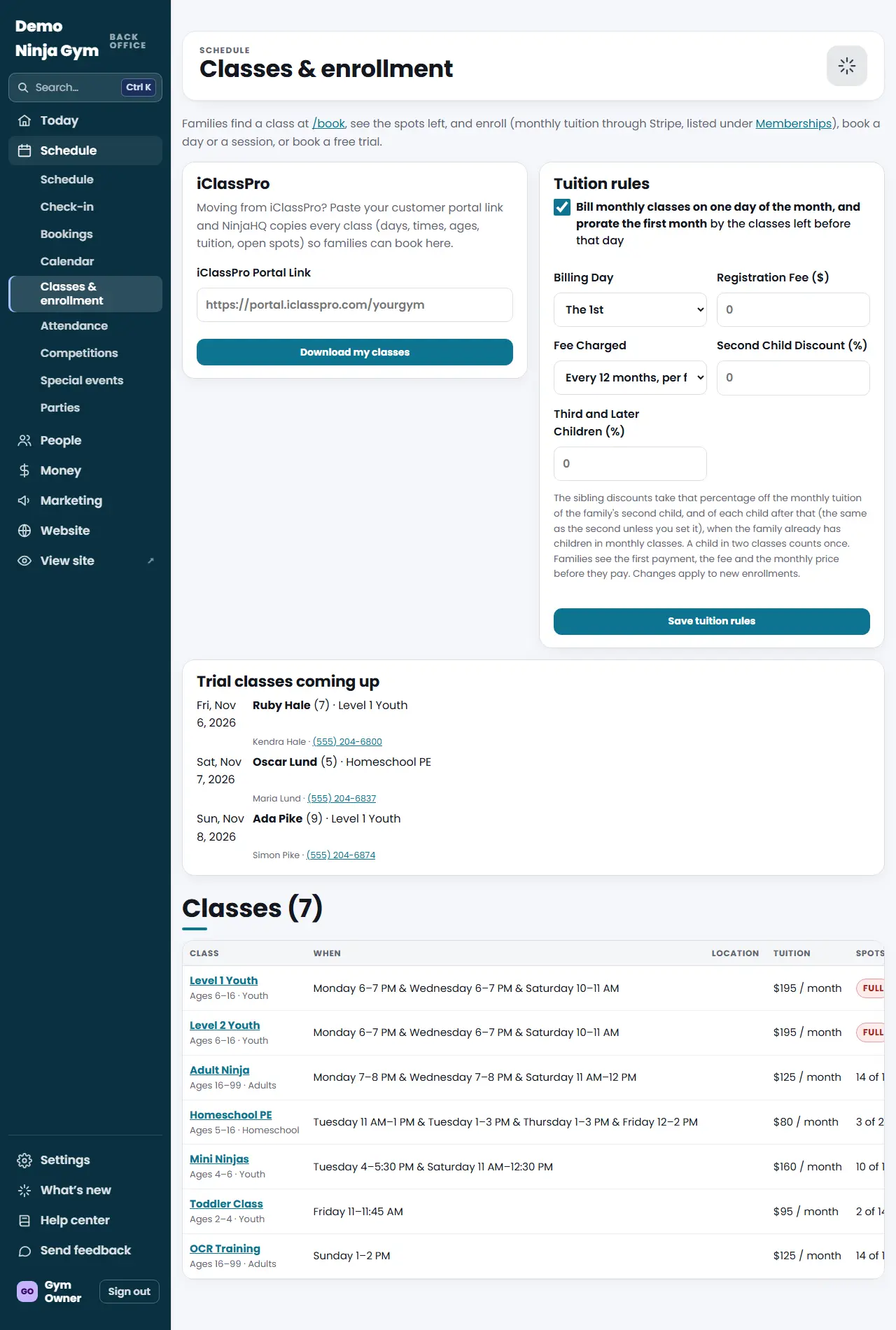
- Open Classes & enrollment. The list shows each class with When, Location, Tuition, Spots left, Enrolled here and Trials coming.
- Press a class name to see everyone enrolled in it (athlete, type, status, parent, booked date) and its Class settings.
Change one class
In Class settings you can change Capacity (Most Athletes) and Tuition ($), tick Hide this class from the Book a class page, and tick Offer free trials. Press Save.
Set the tuition rules
In the Tuition rules box (for all monthly classes):
- Tick Bill monthly classes on one day of the month, and prorate the first month to bill everyone on a Billing Day (the 1st to the 28th). The first payment then covers the classes left before that day.
- Registration Fee ($) and Fee Charged: every 12 months per family, or once per family ever. A family that already paid is not charged again when they use the same email.
- Second Child Discount (%) and Third and Later Children (%), applied at checkout when the same email is used.
Press Save tuition rules. Changes apply to new enrollments only.
What families see
On the class page they choose Enroll, Book a day, Book the session, Join the waitlist (when full) or a Free trial, pick a First Class date, enter the athlete and parent, tick the agreement and press Continue. Monthly tuition is billed each month until they cancel in My account.
Troubleshooting
"Online booking is being set up." No classes are listed yet. Add them by downloading from iClassPro or ask NinjaHQ to import.
A class is missing on the website. It may be hidden. Open the class and untick Hide this class from the Book a class page.
Questions
Where do monthly class enrollments show up?
In Programs > Memberships, where each one is a membership at the class tuition. The class page on Classes & enrollment also has a Billing button that opens it.
Do families need a Stripe payment?
Yes for paid tuition. If online payment is not switched on, the page tells families to book a free trial or call.
When does a new enrollment start?
Families choose a First Class date from the next dates the class meets. With proration on, they pay for the classes left before the billing day.