How do I print class rosters or email the families in a class?
On Programs > Bookings tick the classes, then press Print rosters for one sheet per class, or Email these families to write to everyone booked in them.
Tick one class or many, and print a sheet for the floor or send one message to every family booked in them.
Before you begin
- Printing works for all staff. Emailing families is for owners and managers.
- Email goes through the normal Emails page, so unsubscribes and test sends apply as for any notice.
Steps
- Open Bookings and pick the day or week on the Classes tab.
- Tick the box beside each class you want. The box at the top of a day picks every class that day. A line at the bottom counts what you picked.
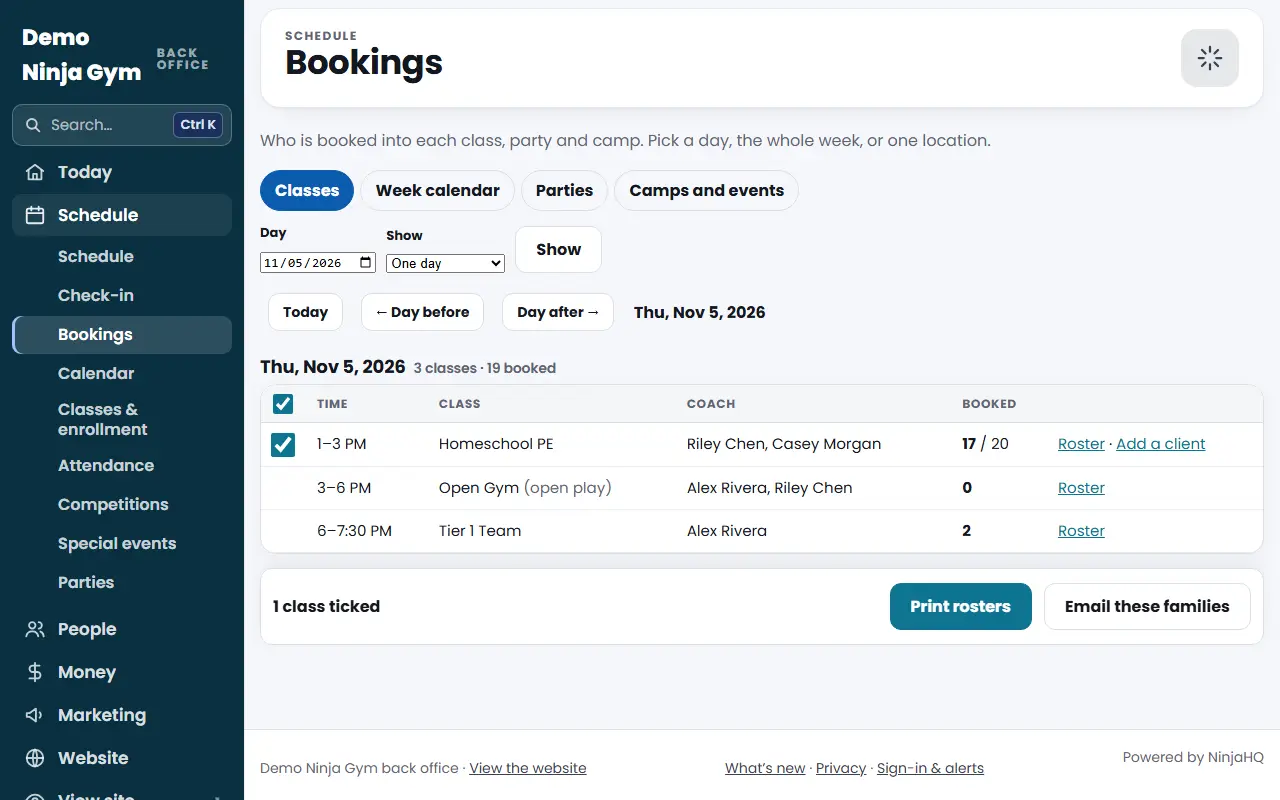
- To print, press Print rosters. A page opens with one roster per class. Press Print at the top of it.
- To email, press Email these families. The Emails page opens with those families as the audience, for example "Families booked in 2 classes." Write your message and send it from there.
What you'll see
Print hides the back-office menu and buttons, so only the rosters print. Cancelled classes are labelled Cancelled on the sheet.
Troubleshooting
"Tick at least one class to print its roster." You pressed Print rosters with nothing ticked. Go back to Bookings and pick a class.
The tick boxes are missing. Only classes that are bookable (with a booking record) have a box. Plain schedule entries do not.
There is no Email these families button. Your role is front desk, which cannot send email.
Questions
How many rosters can I print at once?
Up to 60 classes at a time, one per page.
What is on the printed sheet?
The class, day, time, location and coach, how many are booked, then each athlete with age, how they booked, parent and phone. It has a Here box to tick and three spare lines.
Who can email the families?
Owners and managers. Front desk staff can print but not email.