How do I find a signed waiver or see who has not signed?
Open Front desk > Waivers and search by name, email, phone or birthday. Filter by flagged, expired or kiosk, open one to see it, and download a CSV.
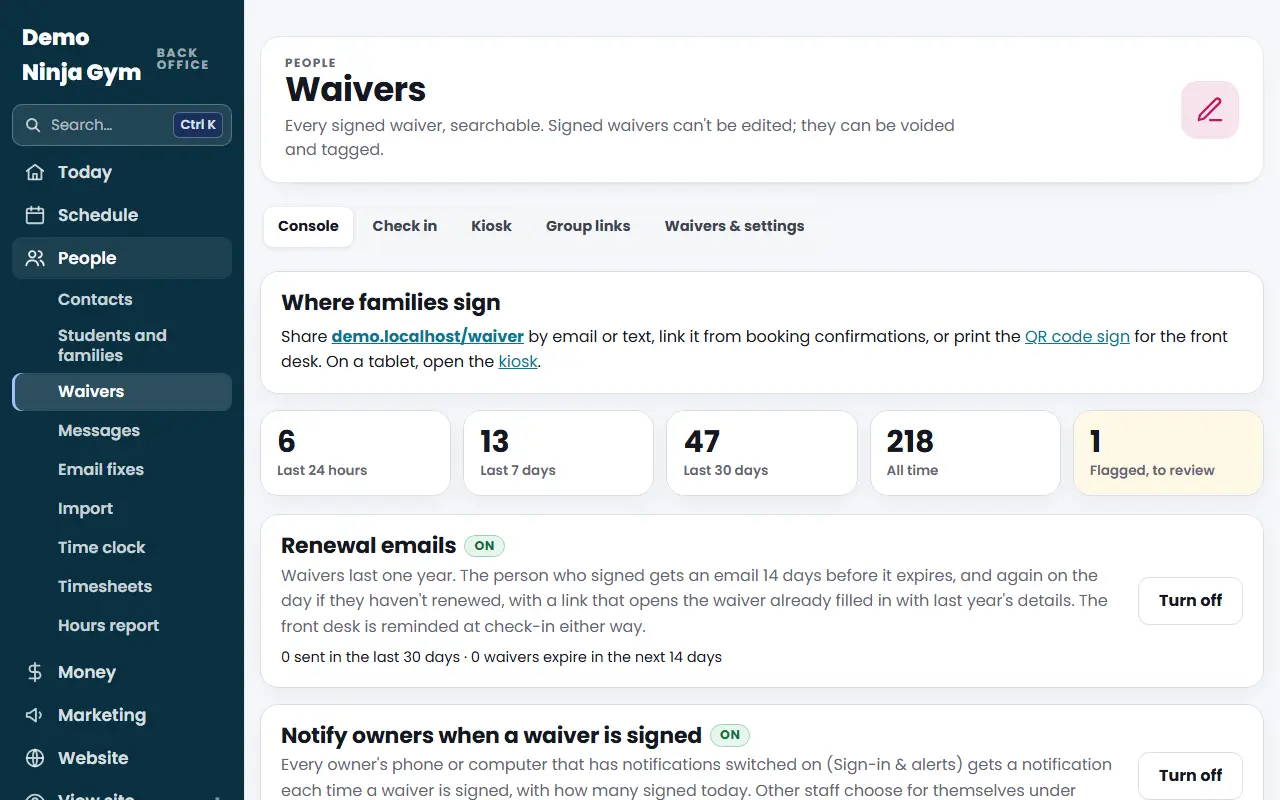
The Waivers page keeps every signed waiver in one searchable list, with a tablet kiosk, group links and the waiver text itself behind tabs at the top.
Before you begin
- A waiver must be live. If none is, the page says No waiver is live yet and links to Waivers & settings, where the owner reviews the text with an attorney and publishes it.
Steps
- Open Waivers under Front desk.
- Type in Search: a name, email, phone number, tag or a birthday as MM/DD/YYYY.
- Narrow with Waiver (if you have more than one), Show (Last 24 hours, Flagged, not reviewed, Expired, Email not confirmed, Signed at the kiosk, Voided), and the From and To dates. Press Search.
- Press a signer's name to open the signed waiver. It shows the signing details, who it covers, flagged answers (with Mark reviewed), tags, a way to send the signer their copy again, and their check-ins. Owners can Void it.
- To get the list as a spreadsheet, press Download these as a spreadsheet (CSV) under the table.
What you'll see
- Cards across the top count waivers signed in the last 24 hours, 7 days, 30 days and all time, and a Flagged, to review count. Flagged means a medical or other answer you asked to be told about. The Home page also lists them as a to-do.
- Each row shows Valid, Expired or Void, and Flagged when it needs review.
- Where families sign gives your /waiver link and a printable QR code sign for the front desk.
- Tabs at the top: Console, Check in (check in someone by their waiver), Kiosk, Group links and Waivers & settings.
Troubleshooting
Someone says they signed but I cannot find them. Try their email or phone. The waiver is filed under whoever signed, not under the child. Check Show: Everything and the dates.
Their status says Expired. Waivers last one year. See How do waiver renewals work?.
A waiver was signed by mistake. Open it and press Void. It stays on file, marked void, and no longer counts as valid.
Questions
Can I edit a signed waiver?
No. A signed waiver cannot be edited. It can be voided (it stays on file, marked void) and tagged.
Where do families sign?
At your website's /waiver page, which you can share by email or text, from the printed QR code sign, or on the kiosk tablet.
Who can void a waiver?
Owners.