How do I check someone in to a class?
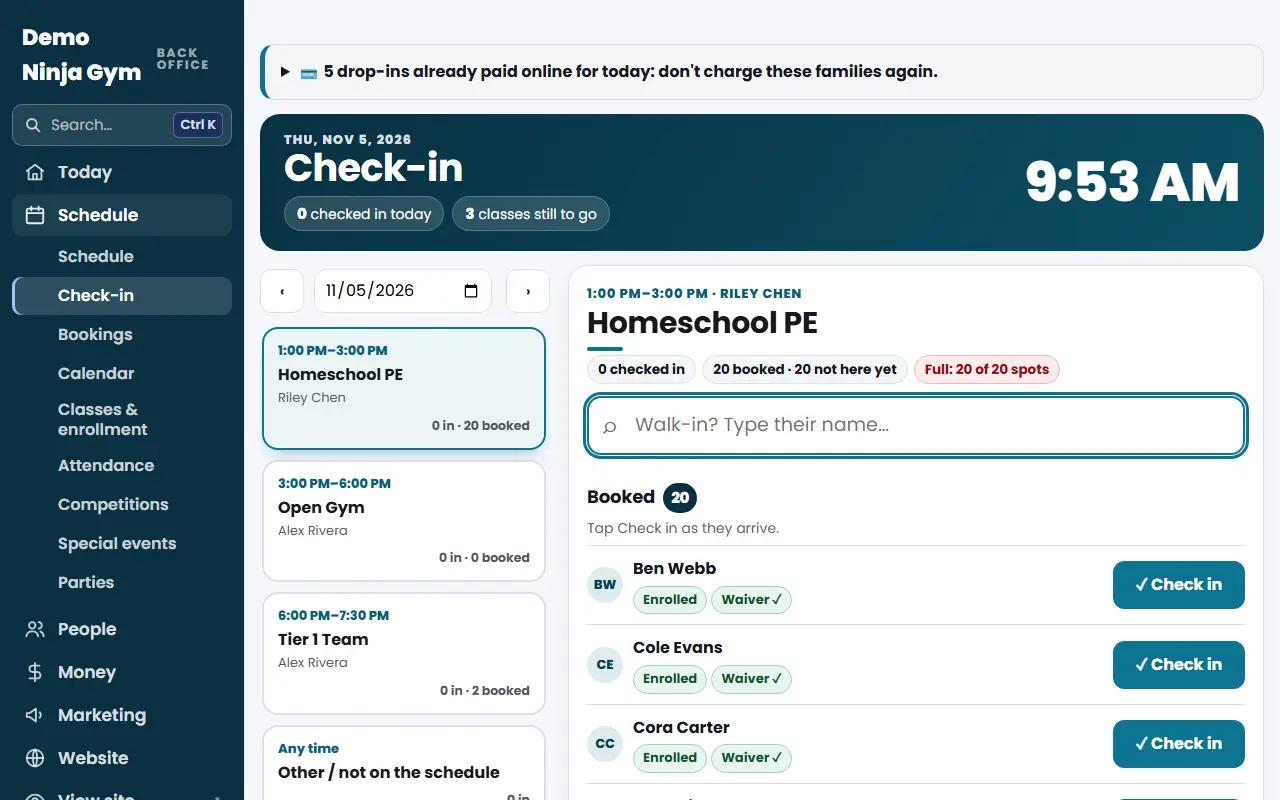
Open Front desk > Check-in, tap today's class, then tap Check in beside a booked name or type a walk-in's name. Members and packs are recorded; others pay.
Check-in is class-first: you open a class from the day's schedule, keep it open and add people as they arrive. It works on a tablet, a computer or a phone.
Before you begin
- Anyone on staff can check people in, including a Staff account in front desk mode.
- The class must be on your weekly schedule. The page also has an Other option for anything not on the schedule.
Steps
- Open Check-in under Front desk. Today's classes are listed with a count like "3 in · 8 booked". The class on now is marked On now. On a phone, swipe the row of classes.
- Tap the class. It stays open while you work through the line.
- People already Booked (online drop-ins, enrolled students and free trials) check in with one tap on Check in. People listed as Usually here came to this class at least twice in the last five weeks: tap Check in… to see their membership or class pack.
- For a walk-in, type their name in Walk-in? Type their name…. Pick the right person from the results:
- Members (monthly or yearly) are recorded and nothing is used up.
- Class packs lose one class. The buyer is emailed how many are left, unless you turned those emails off under Class packs.
- Anyone else is a drop-in: choose Check in as a drop-in. See How do I charge a drop-in at check-in?.
- Optional: use the day buttons (‹ and ›), the date box and Go to check in on a different day. Today brings you back.
What you'll see
- A message at the bottom confirms the check-in with an Undo button for about 10 seconds.
- The class count and the day's "checked in" total go up.
- If a drop-in was already paid online, a notice at the top says "N drop-ins already paid online for today: don't charge these families again." Those names are under Booked, and one tap checks them in.
- A prompt appears before checking in anyone without a valid waiver. It offers Renew on this device (or Sign a waiver on this device), Email a renewal link and Check in anyway. See How do waiver renewals work?.
- If shop orders are waiting for pick-up, a notice at the top links to them.
Troubleshooting
I cannot find them. Type their first and last name, or their email. Contacts imported from another system are searchable too, and show "Waiver on file (old system)" when they signed there.
Check-in says it opens on another day. You are looking at a future date. Press Today.
A pack shows a different buyer. When you search the buyer's name, every person on that pack is offered, marked "bought by".
Questions
I checked in the wrong person. What now?
Press Undo in the message that appears right after, or on their row. A class pack gets its class back, and an online drop-in is open again.
What does a red No waiver mean?
No signed waiver was found for that name. Ask them to sign before they climb. You can still choose Check in anyway.
Can I check people in for tomorrow?
You can look ahead up to 14 days to see who is booked, but check-in opens on the day itself.