How do I edit a coach's profile on my website?
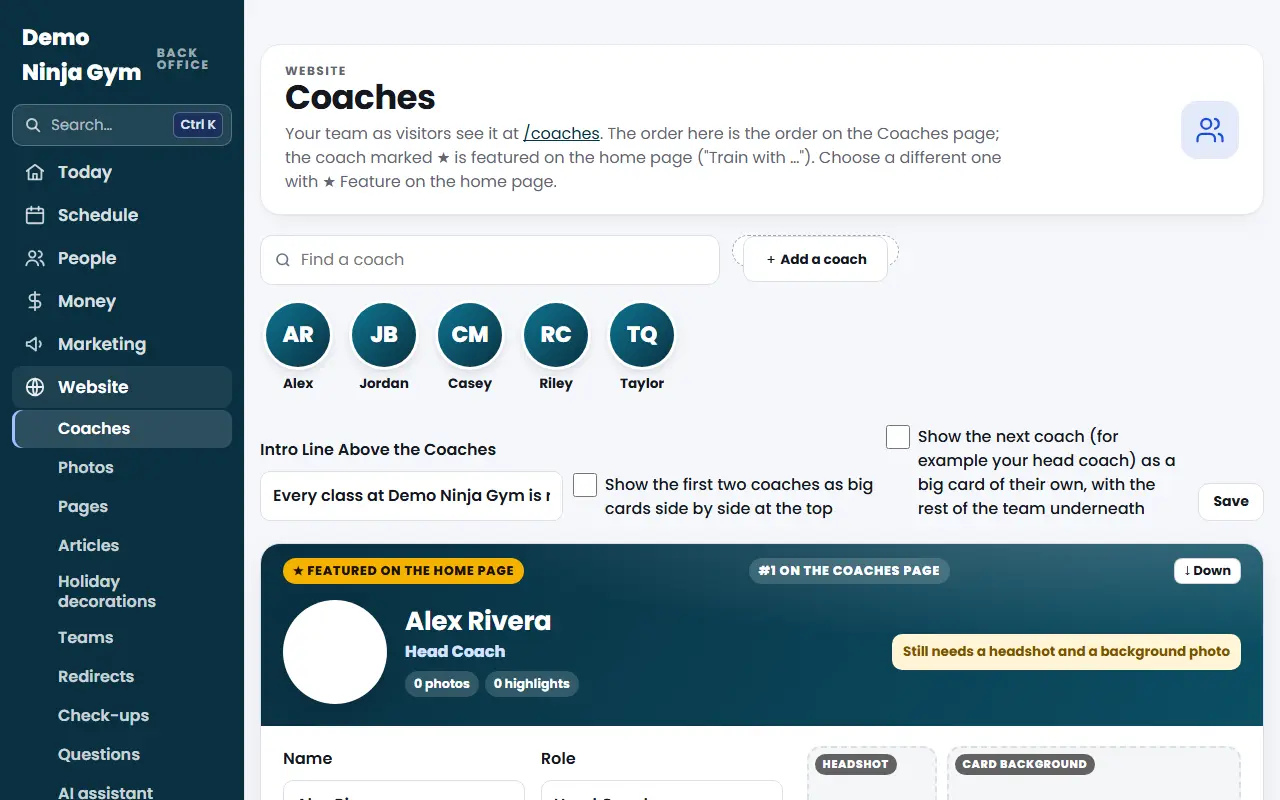
Open Website > Coaches, find the coach's card, change their title, highlights, bio or link, and press Save. The Coaches page on your site updates right away.
Every coach on your Coaches page has a profile card in the back office. This is where you change what families read about each coach.
Before you begin
- Owners and managers can edit coach cards.
- Each card saves on its own, so you can change one coach without touching the others.
Steps
- Open Coaches. Use the Find a coach box, or tap a face in the row of headshots at the top, to jump to a coach.
- In the coach's card, fill in or change:
- Name and Role (for example Head Coach).
- Highlights, One per Line (Up to 6), such as "5 seasons on American Ninja Warrior".
- Bio, a few sentences about their competitions and coaching background.
- Link Label and Link Address (for example Instagram, then instagram.com/coach). You can type just the website without https.
- Press Save (the button says "Save" and the coach's first name, then "'s profile").
- To add a coach, press + Add a coach, type the Name and Role, and press Add. Then fill in the new card.
- To take a coach off the page, press Remove coach at the bottom of their card and confirm.
What you'll see
- A card shows "Still needs a headshot, a background photo and a bio" until those are filled in, then "Profile complete".
- Changes show on your Coaches page of the website right away.
- At the top, Intro Line Above the Coaches is the sentence families read first. Two tick boxes there let you show the first two coaches as big cards side by side, or show the next coach as one big card with the rest of the team underneath. Press Save in that row after changing them.
Troubleshooting
It says another coach is already called that. Two coaches cannot share the exact same name. Add a middle initial or a nickname.
It says "Enter the coach's name." A name needs at least two characters.
The link address is refused. Type a full address such as https://instagram.com/yourname, or a website name like instagram.com/yourname.
I can't see the Coaches screen. Staff accounts that work only at the front desk do not see the Website menu. Ask an owner to change your role.
Questions
How many highlights can a coach have?
Up to six, one per line. Anything after the sixth line is dropped when you save.
What happens to a coach's photos if I rename them?
The photos follow the new name. The old address of the coach's page still works and sends visitors to the new one.
Can I bring back a coach I removed?
Yes. Removing a coach is saved in History, and an owner can put them back from there.