What can an owner, manager, staff member and website helper do?
Owners see everything. Managers run events, parties, the schedule and front desk, not money or staff. Staff get front desk mode. Helpers only answer questions.
NinjaHQ has four roles. Pick the lowest one that lets the person do their job. You can change it later.
Before you begin
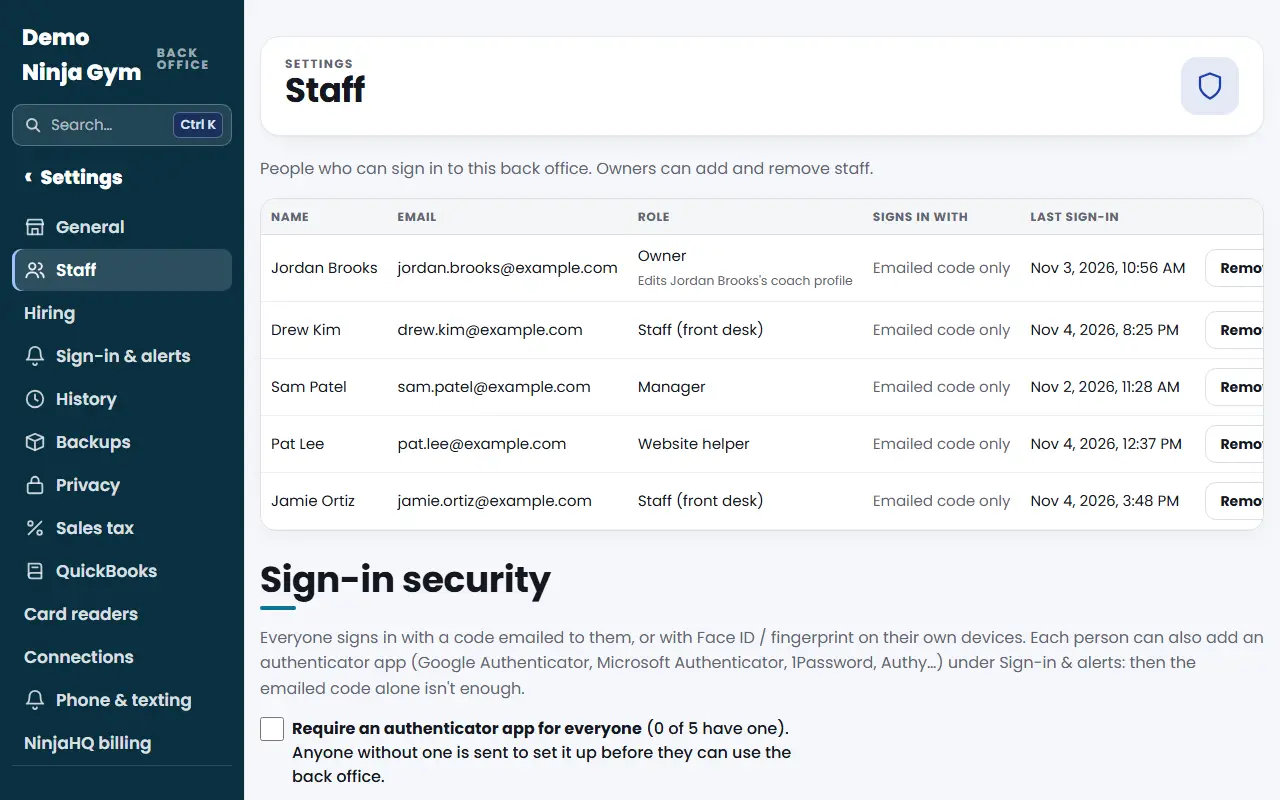
- Only owners can choose roles, on the Staff page under Settings.
- A person has one role. Changing it signs them out, and they sign in again to get the new access.
Steps
To see or set a role, open Staff. New people get their role under Add someone. Existing people change under Roles and coach profiles. See How do I add a staff member or give someone back office access?.
What each role sees
Owner. Everything, including payments, refunds, Stripe, sales tax, QuickBooks, billing, staff, timesheets, Insights and Growth, settings, history, backups and privacy. Keep this for the people who run the business. A gym always needs at least one owner.
Manager. Runs the gym day to day with an owner's rights everywhere except the pages listed below. That covers events and competitions, camps, birthday parties, Parents' Night Out, special events, homeschool, the schedule and closures, check-in, class packs, the register, waivers, gift cards, contacts, messages and emails.
A manager does not get: Payments, Stripe, sales tax, QuickBooks, NinjaHQ billing, card reader set-up, Staff, Hiring, Timesheets, the Hours report, Insights, Growth, Backups, Privacy, History, Go live, Google and local search, website structure pages (Pages, Articles, Teams, Redirects, Check-ups), Vendors, Settings, Connections and Phone & texting. They also cannot import contacts, delete contacts or see a family's ledger. Those pages leave their menu, and if they open one by link they are sent back to the dashboard.
Staff (front desk). Always in front desk mode, with a short menu: Front desk, Check-in, Bookings, Students and families, Take a payment, Class packs, Sign a waiver, Gift cards and the Time clock. They also keep Sign-in & alerts for their own passkeys, notifications and authenticator app. They cannot see reports, settings, refunds, emails, the contact list or staff. Away from a front desk computer, their time clock is their own phone clock.
Website helper. For a friend, a board member or a consultant helping you launch. They see Start here, Questions (only the topics you gave them), My coach profile (if one is linked), Send feedback, What's new and Sign-in & alerts. They see no customers, money, emails or settings. See What does a website helper see?.
What you'll see
- Each person's role appears in the Role column of the Staff table.
- A signed-in person's role shows in the left menu under their name, such as "Manager · name@example.com".
- Pages a role cannot open are simply missing from the menu.
Troubleshooting
My manager says a page is missing. That is by design. Ask an owner to do it, or make them an owner if you trust them with everything.
My staff member sees an empty menu. Staff see only the short front desk menu. If they need more, make them a manager.
Someone can't clock in. Staff clock in on their own phone or on a front desk tablet with a PIN. See How do I set up the time clock?.
Questions
Which role should my front desk person get?
Staff. They get a short menu with check-in, bookings, students and families, taking a payment, class packs, waivers, gift cards and the time clock. They cannot reach reports, settings, refunds or the contact list.
Which role should my general manager get?
Manager. They run the day to day like an owner but cannot see payments, staff, payroll, business numbers or settings.
Can I give someone fewer rights than staff?
Yes. The Website helper role is for someone who only needs to answer questions, test the website and send feedback. They see no customers or money.
Related articles
- How do I add a staff member or give someone back office access?
- How do I change someone's role, or remove them?
- What does a website helper see, and how do I use the Start here page?
- How do I add an authenticator app, or require one for everyone?
- How do I sign in with Face ID and get phone notifications?